

A Google Business Profile is a practical first step toward getting your construction business found in Houston. If you’re wondering how to get your construction business to show up on Google in Houston, eligible businesses can add or claim a profile and complete Google’s verification steps. A verified profile can help customers find you on Google Search and Maps.
Being listed is only the start. Houston customers need clear, consistent contact details and a quick understanding of the work you do. Add accurate business information, describe your service area and specialties, and use the same business name and phone number wherever customers find you.
Project photos make your profile more useful. Images of completed projects and active worksites give potential customers a concrete sense of your construction experience before they call. This article explains how to set up your profile, keep it current, and use project photos and consistent details to strengthen your local presence.
Key Takeaways
- Learn what it takes to claim or create an eligible Google Business Profile and why accurate categories and attributes matter.
- See how project images can help potential customers understand your construction work before they reach out.
- Keep your business name, address, and phone details aligned so customers can recognize and contact you.
- Explore local visibility steps and how construction-focused digital services can support a stronger online presence.
Is a Business Profile on Google?
Eligible businesses can add or claim a Google Business Profile. Accurate details, relevant categories, and regular updates help Houston customers understand your services.
Creating or Claiming a Profile
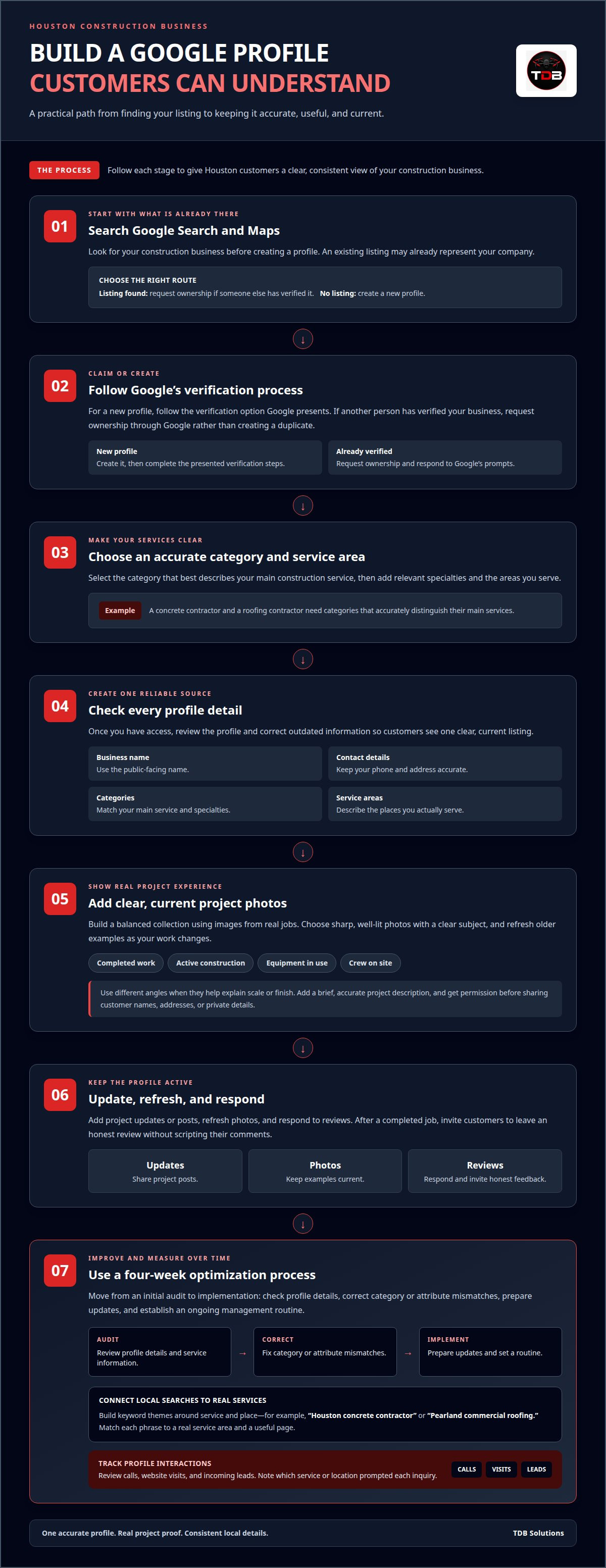
Search Google Search and Maps for your business before creating a profile. If one already exists, claim it; otherwise, create a new profile and follow the verification option Google presents. Choose the category that best describes your main construction service, then add relevant specialties and service areas. Accurate categories help customers distinguish, for example, a concrete contractor from a roofing contractor.
Taking Ownership of a Verified Profile
If someone has already verified your business profile, request ownership through Google’s process rather than creating a duplicate. Follow the on-screen steps and respond to Google’s prompts. Once you have access, review the business name, contact details, categories, service areas, and photos. Correct outdated information so customers see one clear, current profile for your Houston business.
Keep your profile active after setup. Add project updates or posts, refresh photos, and respond to reviews. Reviews can help potential customers assess your work and decide whether to contact you. After completing a job, invite customers to share an honest review without scripting their comments.
Local SEO is a separate marketing activity from managing a profile. Its scope depends on your services and target locations.
Build keyword themes around both service and place. Examples include “Houston concrete contractor” and “Pearland commercial roofing.” Match each phrase to a real service area and a useful page instead of repeating neighborhood names unnaturally.
Track profile interactions alongside your business records. Review calls, website visits, and incoming leads, then note which service or location prompted each inquiry. This helps you see whether profile activity is bringing relevant prospects.
A four-week optimization process can take you from an initial audit to implementation. Use that time to check profile details, correct category or attribute mismatches, prepare updates, and establish a routine for ongoing management.
Business photos and completed-job images
Use project photos to show Houston customers the work behind your company name. A completed patio, commercial roof, or concrete pour gives visitors a clearer picture of your capabilities. Choose images that show the finished result and surrounding work area. A useful collection answers practical questions before a customer calls.
Build a balanced collection from real jobs. Include completed work, active construction, equipment in use, and your crew on site. For a Pearland renovation, pair a wide view with close-ups of the finished materials. For a League City commercial project, show the building context and completed exterior. Each image should represent work you actually do.
Prioritize sharp, well-lit photos with a clear subject. Avoid blurry shots, heavy filters, and crowded frames that obscure the work. Take photos from different angles when that helps explain scale or finish. A ground-level view can show surface detail; an overhead image can clarify the layout of a larger site.
Keep project imagery current as your work changes. Replace older examples when you complete a more relevant project. Add a brief, accurate description that identifies the service or project type, such as “commercial roof replacement in Houston.” Don’t share customer names, addresses, or private project details without permission.
Use only images that accurately represent your business. A polished photo can help customers assess workmanship, but it shouldn’t imply services you don’t provide. For professional property imagery, explore Real Estate Media as a way to create clear visuals for your online presence.
Consistent business name, address, and phone information
Keep your business name, address, and phone number consistent across Google and local listings. Customers may hesitate if one directory shows a different name or disconnected number. For example, don’t list “Bayou Build Co.” on Google and “Bayou Building Company” elsewhere without a clear business reason. Use the same public-facing details wherever your company appears.
Start with a single record of your approved contact information. Include the exact business name, customer-facing address, primary phone number, and website address. Use the same formatting in each listing, including suite numbers and abbreviations. If your office address changes, update Google and other active profiles promptly. Outdated details can send customers to the wrong place.
To get listed in Houston directories and local citation sites, submit your business information to relevant local business and construction directories. Choose listings that accept businesses like yours, then enter the same name, address, and phone details. Keep a record of each listing, its login, and when you updated it.
- Name: Match your business’s public name across profiles.
- Address: Keep street, suite, and city details consistent.
- Phone: Use a reliable number customers can reach.
Review existing listings before adding more. Search your business name and phone number, then note duplicate or outdated entries. Correct the original listing when possible and update other profiles to match. For example, if a directory still shows an old Houston office, replace that address rather than creating another entry.
Keep the same details on your website’s contact page and estimate forms. Customers comparing a Google result with your site should see matching contact information. When your number, address, or business name changes, update the website and directory records together. Consistent information helps customers identify the right construction company and contact you.
How can I improve local SEO rankings for a construction business in Houston?
Build a clear connection between your construction services and Houston locations. Give each major service its own useful website page. A Houston concrete contractor, for example, needs a page explaining the work, service areas, and how customers can request an estimate. A generic page listing every service offers less useful detail.
Use location terms where they fit naturally. A commercial roofing page can mention Houston, Pearland, or League City when those areas match your actual coverage. Add project examples that explain the work and location without revealing private customer details. Keep each page focused on one service and its relevant local audience.
Make your website easy to use on a phone. A Houston property manager should be able to find your service details and contact options quickly. Check that page titles describe the service and location, links lead to the right pages, and important text is readable on smaller screens. Remove outdated service descriptions that no longer match your work.
- Service pages: Explain each construction specialty with clear examples.
- Local relevance: Name Houston-area locations you genuinely serve.
- Useful navigation: Link related services and project information clearly.
Publish practical information customers need before contacting a contractor. A remodeling page might explain project scope, preparation, and common material choices. A commercial construction page can describe the types of projects you handle. Specific, useful content helps visitors decide whether your business fits their needs.
Measure results by tracking defined actions. Record calls, estimate requests, and website inquiries, then compare them with the pages or profile activity customers used. Review those records regularly. If a Houston service page attracts visits but few inquiries, improve its project details and contact path.
Need clearer local pages and construction-focused content? Strengthen your Houston search presence with a focused digital plan.
TDB Solutions: Construction Intelligence
TDB Solutions can support construction businesses seeking clearer digital visibility and better jobsite documentation. Its Construction Intelligence services include progress reports, volumetric measurements, and overhead oversight. These records can give project stakeholders a clearer view of site activity and progress.
If customers reach your profile but your website doesn’t explain your services clearly, TDB Solutions’ Custom Mobile-First Websites offer a focused way to present your work on phones. Marketing Media Production adds professional content, while Aerial Inspections document roofs and other assets from above. Each service addresses a different need, from presenting your business to recording site conditions.
Contact TDB Solutions to discuss which approach fits your construction business.
Turn local visibility into your next project opportunity
Search visibility works best as an ongoing part of how you present your business. Keep your online information useful as your services, projects, and customer needs change. A clear website and relevant project content give potential customers a stronger reason to take the next step.
If you’re deciding how to get your construction business to show up on Google in Houston, connect your online presence to the work you want to win. TDB Solutions offers Construction Intelligence, Custom Mobile-First Websites, and Marketing Media Production to support that effort. These services help you communicate project expertise and give customers clearer ways to understand your business.
You don’t need to tackle every improvement at once. Start with the part that’s holding your visibility back, then build from there. Contact TDB Solutions to discuss your Google visibility and choose a practical next step for your construction business. A stronger online presence starts with a focused move forward.
Frequently Asked Questions
How do I create or claim a Google Business Profile for a construction company?
To get your construction business to appear on Google in Houston, prepare the business details and account access you’ll need before starting. Search your business name in Google Search and Maps to avoid managing a duplicate listing. After setup, keep a record of who manages the profile and where Google displays verification prompts. This makes future updates easier to coordinate.
What Google Business Profile categories should a Houston construction business use?
Choose categories that describe the work customers hire you to do, not search phrases you hope to rank for. A general contractor handling several trades should make its main focus clear, then describe other genuine specialties in the profile. Keep category choices aligned with your website’s service descriptions. Review that alignment when your business shifts toward a different type of construction project.
How can a Houston contractor verify a Google Business Profile and set its service area?
Use the verification method Google presents during profile setup and follow its prompts. Once the profile is active, review how your service coverage appears in Google Search and Maps. List places your team genuinely serves, such as Houston or League City, and update the coverage as your operations change.
What are Google’s rules for service-area businesses and contractor business addresses?
Google profiles can describe service areas even when a business has no physical storefront. Keep address information accurate and make the profile reflect how customers actually engage with your company. Treat the address and service-area fields as separate details: one describes a business location, while the other communicates where work is offered. Avoid wording that could confuse Houston customers about where you operate.
How do I add project photos, services, and updates to a contractor Google Business Profile?
Use Google Search or Maps to manage profile content, then organize updates around useful customer questions. For example, a post about a completed commercial build can explain the project type and work performed. Group photos by project or service so visitors can quickly find relevant examples. Keep descriptions factual and remove content that no longer reflects your current work.
How long does it take for a new Houston contractor to appear on Google Maps?
The timing varies with the verification method and any follow-up steps Google requests. Watch for profile status messages in Google Search or Maps and complete any prompted action. After the profile becomes visible, search your business name and review how its information appears. Visibility in Maps is separate from placement for every construction-related search, so continue building useful local content over time.


