

The best way to present completed projects online in Galveston is to pair polished visuals with clear details about the work, process, and outcome. This gives prospective customers a useful picture of what you do and why the result matters.
Good work deserves to be seen, but a few attractive photos may not tell the full story or help visitors judge a project’s quality and scope. Connect each image to the decisions, services, and results behind the project.
This article explains what to include, how to make project details easy to follow, and how aerial photography can give viewers a fuller picture. You’ll learn how to present finished work with credible visual evidence, useful context, and a format suited to projects across the area.
Key Takeaways
- Build trust by connecting each finished project’s visuals to its scope, process, and completed work.
- Organize portfolio pages so visitors can quickly find relevant projects and understand what your business delivered.
- Choose photos, video, and project details that make the quality and setting of the work clear.
- TDB Solutions can pair custom mobile-first websites with marketing media production and aerial photography to present your completed work online.
Project quality and comprehensiveness
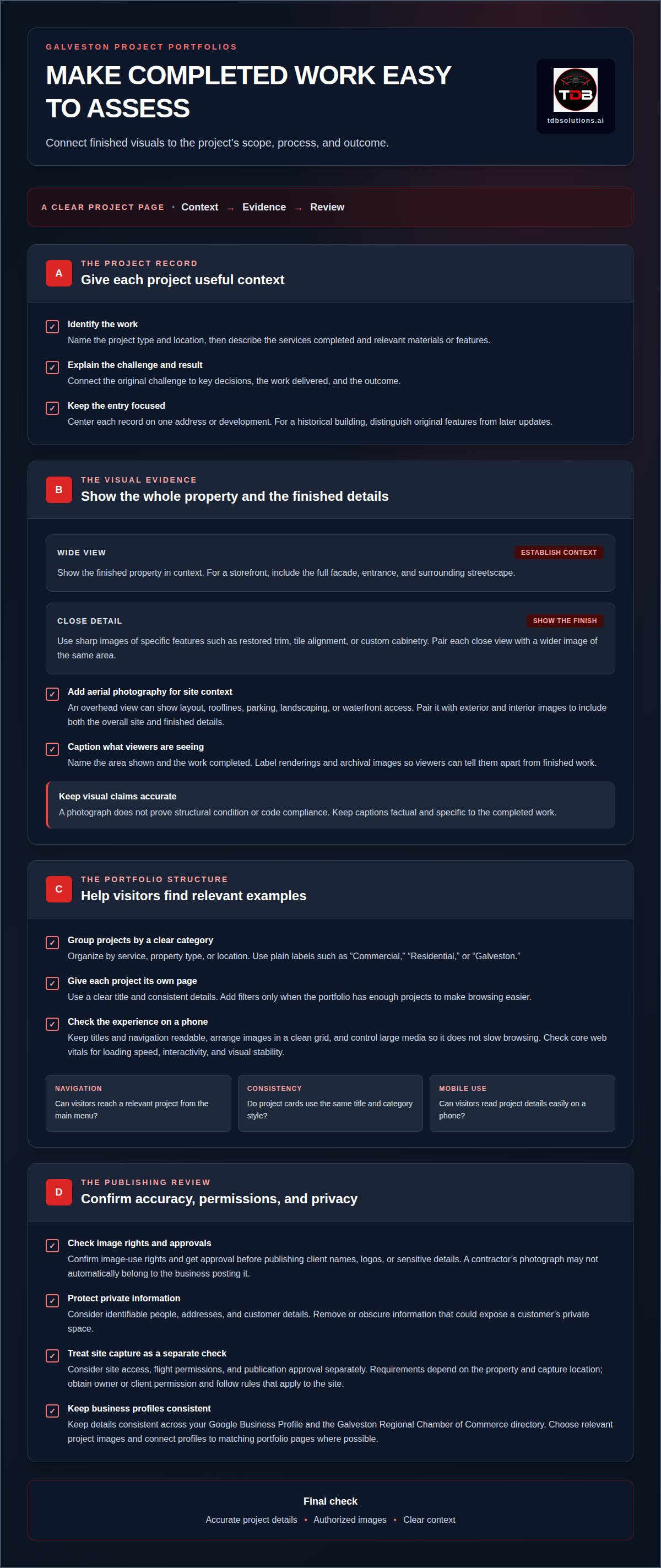
A project record is a concise account of completed work, its scope, and its outcome. For a Galveston renovation, pair finished images with the original challenge, key decisions, and delivered result. This gives visitors evidence they can assess, not just attractive visuals. Keep each entry focused on one address or development.
A strong project record accurately represents the finished work and provides enough context to understand it. Name the project type and location, describe the services completed, and note relevant materials or features. Explain a challenge and how the work addressed it. A clear sequence helps prospective customers assess your relevant experience and decide whether to get in touch.
For a historical building, distinguish original features from later updates. Caption each image with the area shown and the work completed. Avoid implying that a photograph proves structural condition or code compliance. Use dated project records when timing matters, and label renderings or archival images so viewers can distinguish them from completed work.
For Galveston photography, consider site access, flight permissions, and publication approval separately. Requirements depend on the property and capture location, so obtain owner or client permission and follow rules that apply to the specific site. In public areas, frame images to avoid exposing identifiable people or private activity.
A Google Business Profile and the Galveston Regional Chamber of Commerce directory can introduce your business and project work. Keep business details consistent, choose relevant project images, and link each profile to a matching portfolio page where possible. Profiles introduce the work; detailed project pages explain its scope and context.
Copyright applies to creative materials, while privacy concerns can involve identifiable people, addresses, or customer details. Before publishing, confirm image-use rights and obtain approval for client names, logos, and sensitive details. A contractor’s photograph may not automatically belong to the business posting it. Remove or obscure information that could expose a customer’s private space.
Review each project record for factual accuracy, image permissions, and useful context. For example, make sure a Galveston storefront caption describes the completed work, the photography is authorized, and the text avoids unsupported claims. This helps protect trust while making the project’s quality and scope easy to understand.
How should a professional structure and design a project portfolio website for your business?
Portfolio architecture is the arrangement of pages that guides visitors through your work. For a Galveston business, group projects by service, property type, or location. A contractor might separate commercial renovations from residential builds. This structure helps visitors find relevant examples without scrolling through unrelated work. Give each project its own page, with a clear title and consistent details.
Category navigation uses labeled links to sort projects by meaningful traits. Choose plain labels such as “Commercial,” “Residential,” or “Galveston.” Avoid clever names that obscure what visitors will find. Add filters only when the portfolio has enough projects to make browsing easier. Keep category labels consistent across menus, page titles, and project cards. A visitor who selects “Waterfront” should see work that fits that category.
Responsive design adapts a layout to phones, tablets, and desktop screens. Project titles and navigation should remain easy to read on phones. Arrange images in a clean grid and open each project on its own page. Keep image files and page elements controlled so large media doesn’t slow browsing. Check core web vitals, which measure loading speed, interactivity, and visual stability.
A conversion path guides visitors from a project page to a useful next step. Place a clear contact option near the project details, not only in the footer. Use descriptive buttons such as “Discuss a similar project.” Keep the route direct: project page, service information, contact form. A custom mobile-first website can present completed Galveston projects clearly and professionally.
Before publishing, organize the design around three practical checks:
- Navigation: Can visitors reach a relevant project from the main menu?
- Consistency: Do project cards use the same title and category style?
- Mobile usability: Can visitors read details and use contact links on a phone?
Make every page easy to find, scan, and understand. A well-organized portfolio turns individual examples into a clear picture of your business’s work.
What photos, videos, and project details should a professional include in your completed-project portfolio?
An establishing photo is a wide image that shows a finished project in context. For a Galveston storefront, frame the full facade, entrance, and surrounding streetscape. Choose a clear viewpoint that communicates the property’s scale. Then add closer images showing finishes, fixtures, or distinctive construction details. Consistent color balance across the set helps represent the work accurately.
A detail photo is a close view of a specific feature or finish. Use it to show examples such as restored trim, tile alignment, or custom cabinetry. Keep the subject sharp and remove distracting objects from the frame. Pair the close view with a wider image of the same area. This connection helps visitors understand where each detail fits.
Aerial photography captures a property from an airborne platform. It can show the layout, rooflines, parking, landscaping, or waterfront access. For a completed Galveston property, an overhead view can add context that ground-level photos miss. Combine it with exterior and interior images so visitors see both the overall site and the finished details.
A project video is a moving visual record that guides viewers through finished work. Use a steady sequence: exterior approach, main spaces, notable features, then a final wide view. Keep transitions simple and add concise on-screen labels when locations need clarification. Avoid dramatic edits that distort colors or make the project appear larger than it is.
A project caption briefly identifies what an image or video shows. Pair each asset with a useful label, such as “completed entry” or “finished roofline.” Add the project type, services performed, and relevant materials or design features. Make clear which images show the completed result and which document earlier stages.
A project summary is a compact record of the work behind the media. Include the challenge, completed work, and outcome, using verified details. For example, explain how a renovated interior changed its layout or improved access. Credit the photographer as agreed, and keep customer names private when needed. A precise media package makes each project easier to assess and compare.
TDB Solutions
TDB Solutions helps turn finished work into clear online project pages. Its Custom Mobile-First Websites and Marketing Media Production bring project information and visual content together. These services can help when strong work exists but its online presentation feels scattered, incomplete, or hard to browse. The aim is a consistent account that helps visitors understand the work and your role in it.
For a Galveston contractor, a project page can connect the finished property, the services performed, and relevant images. TDB Solutions can shape the page around details such as project type, location, scope, and key features. You choose which completed projects best represent your business. A clear page structure then makes those examples easier for prospective customers to explore.
Marketing Media Production supports the visual side of the story. Aerial and ground-level media offer different perspectives on a property, while Real Estate Media helps present its features and setting. Clear captions and relevant details connect each image to the work. The result gives visitors more to understand than a collection of photos without context.
A Custom Mobile-First Website can organize project pages for phone and desktop visitors. TDB Solutions can align navigation, project categories, and page design with your business identity. Branding and graphic design can also keep visual elements consistent across the site. This approach suits businesses that need a professional portfolio alongside their main service information.
Construction Intelligence and aerial inspection address different needs from a completed-project portfolio. They support construction documentation and remote visual examination, respectively. When relevant to your work, selected project information can help explain your technical capabilities. Keep each page grounded in the project’s actual scope and deliverables.
Before the work begins, gather approved project details, media, and the main message for each page. Align the content with your business goals and the visitors you want to reach in Galveston or nearby communities such as Friendswood, Pearland, League City, and Houston. TDB Solutions can bring those elements together in a coherent online presentation.
Contact TDB Solutions to discuss presenting your completed projects online.
Frequently Asked Questions
Which platforms can a professional use to present your completed projects online?
A professional can feature detailed project pages on a custom website, then adapt selected content for social media. Instagram and Facebook suit visual updates, while LinkedIn can frame a project around commercial expertise or a business milestone. Keep the website as the main reference point, with social posts directing interested viewers to the relevant project page. Choose channels your customers already use and maintain them consistently.
How can project pages improve local SEO and attract customers in Galveston, Texas?
Keep business details consistent on your Google Business Profile and Galveston Regional Chamber of Commerce directory listing. Use relevant project images and link each profile to a matching portfolio page. Organize projects by service or location, and add a clear contact option to each project page so visitors can explore relevant work and get in touch.
How can a business get client permission and testimonials for online project pages?
Before publishing, confirm image-use rights and obtain client approval for names, logos, and sensitive details. Keep customer names private when needed, and include testimonials only when you have permission to share them.


