
Canva can be the faster choice for simple, repeatable graphics, while a professional designer is better suited to building a distinctive brand identity and preparing assets for different uses. For Houston businesses comparing Canva vs. a professional graphic designer for branding, the right fit depends on how much customization, consistency, and production support you need.
Starting with a DIY tool makes sense: you can create and update designs yourself. But speed alone does not ensure every graphic fits your brand or prints well. Templates can also make your visuals look similar to other businesses’.
This guide compares the options in terms of brand consistency, cost factors, print quality, and ready-to-use files. You’ll see where Canva can handle everyday marketing assets, when a designer’s strategic input may help, and what to consider before choosing a path for your Houston business.
Key Takeaways
- Use Canva for quick, repeatable graphics, and keep your logo, colors, and fonts consistent across every asset.
- Compare design options by the time, strategy, and customization involved, not just the initial effort.
- Plan for print requirements early so your files carry the right layout and visual consistency across formats.
- Choose deliverables around how your business will use its brand, from a distinct visual identity to practical marketing materials.
Brand consistency
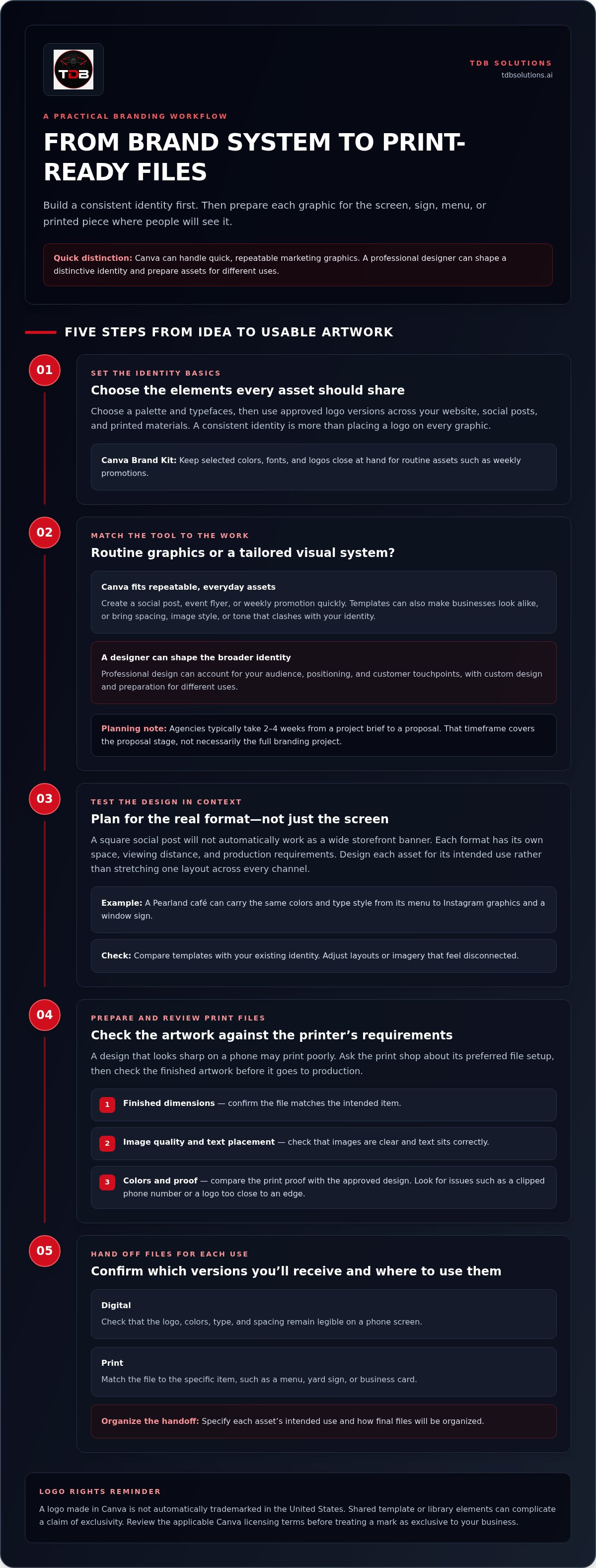
Canva can help you create a social post or event flyer quickly. But popular templates can make Houston businesses look alike. A consistent identity takes more than placing a logo on every graphic. Choose a palette and typefaces, then use approved logo versions across your website, social posts, and printed materials. For example, a Pearland café can carry the same colors and type style from its menu to its Instagram graphics and window sign.
Canva’s Brand Kit keeps selected colors, fonts, and logos close at hand, which helps with routine assets such as weekly promotions. The challenge arises when a template’s spacing, image style, or tone clashes with your identity. A designer shapes those choices around your audience, positioning, and customer touchpoints. The Canva vs. professional graphic designer for branding Houston decision often comes down to whether you need a tool for making assets or a strategist to define the system.
A Canva brand kit can come together quickly once you’ve chosen the core elements. A professional branding project takes longer because it can involve discovery, custom design, feedback, and preparation for different uses. Agencies typically take 2-4 weeks from a project brief to a proposal. That timeframe covers the proposal stage, not necessarily the full branding project. In a Canva vs professional graphic designer for branding Houston comparison, distinguish setup speed from the work needed to create a tailored identity.
A logo made in Canva is not automatically trademarked in the United States just because you created it. Protection depends on the logo and your rights to its components; shared template or library elements can complicate a claim of exclusivity. Review the applicable Canva licensing terms and consider original visual elements for a long-term brand mark.
- Save approved logo files, colors, and fonts in Canva, then apply them to real examples such as a promotion and flyer.
- Compare templates with your existing identity. Adjust layouts or imagery that make a design feel disconnected.
- For custom work, prepare a brief covering your audience, positioning, and intended uses.
- Review the rights attached to logo elements before treating the mark as exclusive to your business.
Estimated brand designer costs
If you’re comparing Canva with a professional graphic designer for branding in Houston, start by defining what the work needs to accomplish. Identify the audiences you want to reach, where your identity will appear, and which materials need to work together. That scope gives you a practical basis for comparing a DIY process with professional support, rather than reducing the decision to a logo alone.
Canva designs may be used commercially, subject to the terms for each asset and use. Review Canva’s licensing terms before using library elements in a logo or other brand mark, and keep track of which assets your business created itself.
To evaluate a Houston designer, review complete identity projects, not just isolated logo images. Look for visual systems suited to each business and carried through different applications. In a conversation, describe a real task, such as updating a service page or preparing a seasonal campaign. A clear explanation of the design approach and decision-making process helps you understand how the collaboration could work.
Set project expectations in writing before design begins. Specify each asset’s intended use, who approves creative decisions, how feedback will be shared, and how final files will be organized. For example, name the person who will approve the logo and identify which staff members need access to editable marketing templates. Clear roles can prevent conflicting feedback and make the handoff more useful.
- Write a short creative brief with your audience, brand priorities, and planned uses.
- Review portfolio examples for fit and consistency across applications.
- Document approval roles, asset usage, and file organization before work starts.
If you’re shaping a distinct identity, explore brand identity and marketing assets as a practical next step.
Cost comparison should follow the scope you have defined, since the amount of work and the kind of provider affect what you are evaluating. The page estimates agencies typically add a 20-40% markup. Use these figures as reference points when requesting estimates, and make sure each proposal describes the work included. Comparing proposals against the same brief can help clarify whether the quoted support matches your needs, rather than focusing on price alone.
Print-ready files and consistency across formats
A design that looks sharp on a phone may print poorly on a menu, yard sign, or business card. Each format has different space, viewing distance, and production requirements. A square social post, for example, will not automatically work as a wide storefront banner. Plan each asset for its actual use rather than stretching one digital layout across every channel.
Canva can help you create routine digital graphics, but how a file looks on screen does not show how it will reproduce on paper. Before sending artwork to a printer, review the finished dimensions, image quality, text placement, and colors. Ask the print shop about its preferred file setup, then compare a proof with the approved design. This check can catch a clipped phone number or a logo too close to an edge.
Professional designers bring production skills that extend beyond arranging text and images. One graphic designer says they spent 16 years learning about toner, paper, printers, and print-file safety margins. That experience can help prepare files for print and keep brand elements consistent across formats. The key is a deliberate handoff: confirm which versions you’ll receive and where each one should be used.
- For digital use: Check that the logo, colors, type, and spacing remain legible on a phone screen.
- For print: Match the file to the item, such as a Pearland restaurant menu or a Galveston event flyer.
- For consistency: Compare the final artwork with your approved brand assets before publication or printing.
- For handoff: Organize files by purpose, such as social, website, signage, and print, so you can find the correct version.
Use Canva when you can manage those checks and want to create repeatable pieces yourself. A professional designer can prepare print-ready files and adapt your identity across materials, helping your Houston business present a consistent visual system online and offline.
What branding deliverables does a professional graphic designer provide compared with Canva?
Canva provides tools for assembling graphics from templates and editable elements. A professional designer can create a custom visual identity aligned with your brand and its place in the market. The process starts with decisions about your audience, positioning, and visual direction, then turns those choices into assets for your business communications.
For a Houston service business, a branding project might include a primary logo, alternate logo layouts, a color palette, and selected typefaces. A designer can also create examples showing how these elements work on a website, social post, or printed flyer. Together, these pieces provide a working system rather than a single graphic you have to adapt on your own.
Canva is useful for creating routine variations once the visual direction is set. You can update a promotion or resize a social graphic using your chosen colors and fonts. A designer’s role is different: they make the core decisions, refine custom artwork, and create assets suited to your actual uses. Deliverables depend on the agreed project scope.
- Identity assets: Logo concepts, approved logo versions, colors, and typography choices.
- Application examples: Sample layouts for a digital announcement, business card, or service flyer.
- Working files: The final artwork and agreed editable files, organized so you can find the right version.
- Usage guidance: Clear direction on which logo version, color, or layout fits each application.
Before work begins, list the materials your business needs and where each will appear. A League City contractor may need a proposal cover, jobsite sign, and social graphics; a Galveston shop may need storefront and promotional materials. This list helps define the design scope and ties the deliverables to real business tasks.
If you’re ready to turn your brand direction into practical assets, take the next step and discuss your branding and graphic design needs.
Canva users may create designs that do not fit seamlessly with their brand's existing identity, so a defined visual system can help keep everyday materials aligned. Facebook posts with images get 2.3 times more engagement than Facebook posts without images, and Twitter updates with images can generate 150% more retweets than text-only tweets. Keep marketing copy short and to the point so key messaging does not get lost in excess text.
TDB Solutions: Construction Intelligence
TDB Solutions helps construction teams turn project activity into clear, useful site information. Its Construction Intelligence service supports regular aerial documentation, site progress reports, volumetric measurements, and overhead oversight. For Houston contractors, these materials can give clients and stakeholders a clearer view of work underway.
This serves a different purpose from a visual brand identity. Canva or a designer can shape how your company looks; project documentation communicates what is happening on a jobsite. If you need both stronger business communications and clearer project visibility, consider how each supports your goals.
TDB Solutions also provides Custom Mobile-First Websites, Marketing Media Production, and Aerial Inspections. These services can help connect your digital presence with project information and visual content.
Visit tdbsolutions.ai to discuss Construction Intelligence for your project.
Set Your Brand Up for Its Next Stage
The choice between Canva and a professional designer for branding in Houston depends on what your business needs next. If you’re still testing ideas, creating graphics yourself can help you move quickly. If your identity needs clearer direction across customer touchpoints, professional input can help turn that direction into a practical design system.
Choose one next step: list where customers encounter your brand, then identify where your current visuals feel inconsistent or difficult to use. This brief review gives you a focused starting point, whether you refine your Canva designs or seek tailored creative support. A defined goal also helps keep the work connected to how your business communicates.
When you’re ready to develop branding that fits your business, contact TDB Solutions about branding. Start with the outcome you want your visuals to support, and take the next step with confidence.
Frequently Asked Questions
How much does a professional brand identity designer cost in Houston, Texas?
The work depends on the identity and materials your business needs. A focused logo project differs from a broader scope covering brand direction, digital assets, and print applications. To compare options, list your intended uses, required deliverables, and approval process. For example, a Houston business preparing for a new storefront may need coordinated visual materials beyond its existing website graphics.


