

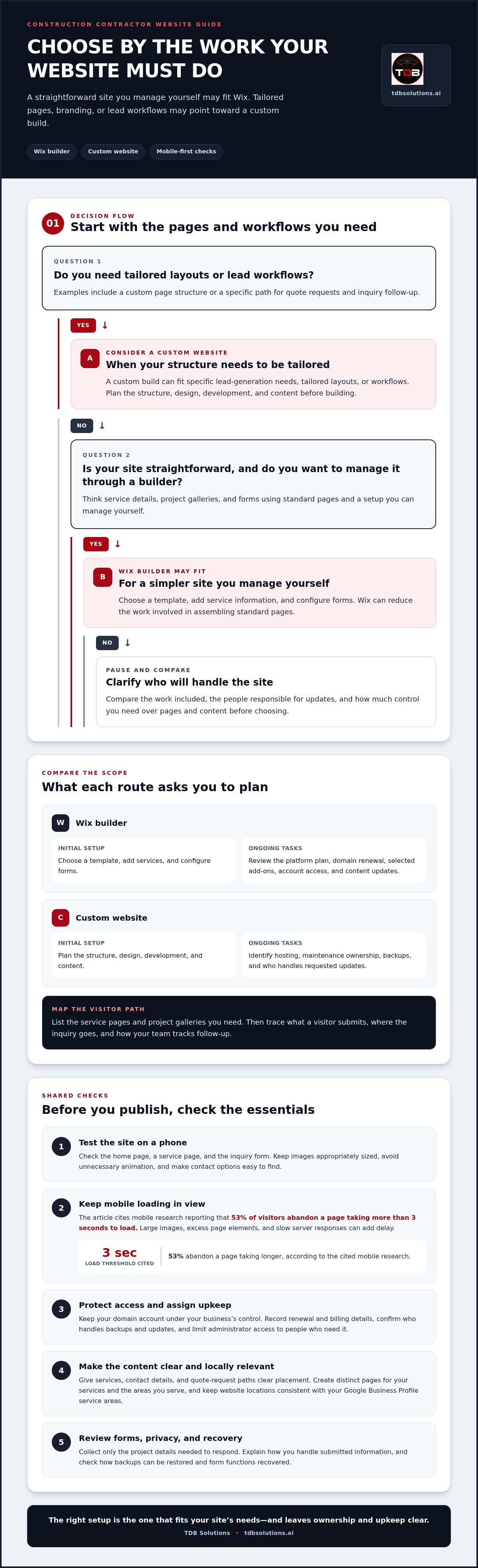
Wix isn’t automatically the best choice for a construction contractor, and a custom website isn’t always necessary. The Wix vs custom mobile-first website for construction contractors decision depends on your goals: Wix can suit a straightforward site you manage yourself, while a custom build may better fit specific lead-generation needs, branding, or plans to grow.
Your site needs to work on a phone, explain your services clearly, and make it easy for potential clients to take the next step. This guide compares Wix and custom mobile-first websites for construction contractors across setup and ongoing costs, security, customization, mobile performance, and ownership. You’ll see where each option fits, what trade-offs to weigh, and how to choose a website that supports your contracting business without adding unnecessary complexity.
Key Takeaways
- Compare the full cost of running each site, including ongoing hosting and maintenance, rather than judging by the initial setup alone.
- Check what each platform handles for security and upkeep, and identify which tasks you’ll need to manage yourself.
- Match the website’s structure to your contracting work, from project galleries and service details to clear quote-request paths.
- Test key pages on a phone and review loading speed, interactivity, and visual stability before choosing a design.
- Before committing, consider how easily you can control your content and move it if your business needs change.
Professional contractor website costs
For a construction contractor, the practical cost comparison is between a builder’s recurring platform expenses and a custom site’s build, hosting, and upkeep. There’s no single total that fits every website. Scope matters: a basic service-and-contact site requires less work than one with project galleries, quote forms, service-area pages, and custom integrations.
A Wix site can reduce the work involved in assembling standard pages. A custom build may require more planning and development, especially when you need tailored layouts or lead workflows. Compare what the work includes, not just the starting offer. Ask what covers design, mobile layouts, page setup, content migration, technical maintenance, and future changes.
| Option | Initial work | Ongoing expenses | Best fit |
|---|---|---|---|
| Wix builder | Choose a template, add services, and configure forms | Platform plan, domain, and selected add-ons | A contractor managing a straightforward site |
| Custom website | Plan the structure, design, development, and content | Hosting, maintenance, and requested updates | A contractor needing tailored pages or workflows |
Free plans can help you test a builder and arrange draft pages. Before publishing, check whether the plan supports your chosen domain, removes platform branding, and includes the functions your business needs. A public-facing contractor site should make contact details and service information easy to find, so visitors know how to reach you.
Monthly website expenses depend on the setup. For Wix, review the platform plan, domain renewal, and any paid add-ons. For a custom site, account for hosting, maintenance, and separate services tied to your chosen tools. A photo-heavy project gallery, for example, may require more content preparation and ongoing updates than a small set of service pages.
Wix can support local SEO basics, including service pages and page titles. A custom site can tailor its structure and technical setup to your search goals. Either way, create distinct pages for your services and the areas you serve, such as Houston, Pearland, or Galveston.
For local visibility, keep your Google Business Profile service areas consistent with the locations named on your website. Use clear service-area language and accurate contact details so visitors can tell whether you work near their project.
Businesses open to the public must make their websites accessible to people with disabilities, according to the U.S. Department of Justice. Privacy practices depend on the information your forms collect. Explain how you handle submitted details, and limit collection to what your inquiry process needs.
Wix integrations for quote forms, scheduling, CRM tools, and project galleries depend on the selected setup and available connections. Map the workflow first: identify what a visitor submits, where the inquiry goes, and how your team tracks follow-up.
Choose Wix for a simpler site you can manage through a builder. Choose custom development when tailored workflows and greater page control justify the extra planning.
Hosting, uptime, and security
Hosting stores your website’s files and delivers them to visitors. A Wix site combines its builder and hosting platform, while a custom website uses hosting selected for its setup. Either way, your contractor website needs dependable access when a homeowner or project manager searches for your services.
Separate your domain from your hosting. Your domain is the address people enter; hosting serves the website behind it. Keep domain account access under your business’s control, and record renewal and billing details. If a web professional manages the setup, make sure your business retains the account credentials and knows who handles renewals.
Uptime describes whether visitors can reach your pages. A hosting interruption can block access to project details, contact forms, and service information. Ask how the chosen setup handles outages, backups, software updates, and security monitoring. The answers clarify who owns each maintenance task, whether you choose a website builder or custom development.
Security depends on more than the platform name. Review how administrators access the site, how form submissions are handled, and how backups can be restored. Limit access to people who need it, remove accounts when roles change, and use strong, unique passwords. For a quote form, collect only the project details needed to respond.
Mobile speed connects hosting choices to real visitor behavior. Google’s cited mobile research reports that 53% of visitors abandon a page taking more than 3 seconds to load. A 4-second load is described as slow for a contractor website. Large images, excess page elements, and slow server responses can all add delay.
Optimize images before adding them to a project gallery. Use appropriately sized files, avoid unnecessary animation, and keep the first screen focused on your services and contact options. Then test key pages on a phone using a consistent connection. Check the home page, a service page, and the inquiry form, not just the desktop layout.
- For a Wix site: Review what the platform manages and what remains your responsibility, including account access, domain renewal, content updates, and form handling.
- For a custom site: Identify the hosting provider, maintenance owner, backup process, and steps for restoring pages or form functions.
- For either option: Test mobile load behavior, confirm secure access to administrative accounts, and make sure your domain remains in your control.
Choose the setup with clearly assigned maintenance tasks, accessible account ownership, and pages that load promptly on mobile. If you want a site planned around those practical requirements, explore custom mobile-first website planning.
Mobile prospects may judge a business website in roughly three seconds, so dependable hosting and a lean page experience support more than convenience: they can help keep potential customers engaged. For many contractors in Houston, Friendswood, Pearland, Galveston, and League City focused on ranking and generating leads, a custom website can pay for itself within two to three years.
Plan for migration before switching from Wix. It may require carefully configured redirects because Wix URLs may not match the URLs selected for a custom site. Confirm which pages need redirects and who will configure them, and include this work in the handoff plan alongside account ownership, backups, and maintenance responsibilities.
Website templates and customization
A construction website template gives you a ready-made page structure. Wix lets you select a design, replace sample text, and add your services, photos, and contact details. That can help you launch a business website without building every page from scratch. The trade-off is that your layout starts within the template’s available structure.
Construction templates should fit the work you want to win. A home builder might need virtual home tours, a design inspiration gallery, detailed service descriptions, and testimonials. A roofing contractor may need a damage gallery and an inspection booking path. Choose a template based on the customer’s next step, not only its colors or first-screen image.
Custom development starts with your business requirements instead of a prebuilt layout. You can plan separate pages for commercial construction, renovations, and roofing, then shape each page around its audience. A commercial contractor could pair industry case studies with a capability statement and an RFP inquiry path. A home renovation firm could give before-and-after work its own page.
Choosing between Wix and a custom mobile-first website for construction contractors doesn’t guarantee different lead conversion results. Visitors are more likely to take action when pages explain relevant services, show credible project examples, and make the next step clear. A custom layout can support a specific process, but the wording, page structure, and form experience still matter.
Compare each option against practical tasks:
- Page structure: List the services, locations, and project types that need separate pages.
- Brand fit: Check whether the templates support your logo, photography, typography, and preferred page order.
- Lead path: Trace how a visitor moves from a project example to a quote request or call.
- Future edits: Decide who will update project details, service descriptions, and photos after launch.
Before choosing a Wix template, map your navigation on paper. Put the main services in a clear menu, then group project examples by work type. Keep the inquiry path visible on service pages. A visitor looking at a commercial project shouldn’t have to return to the home page to find your contact form.
With custom development, agree on the page list and review wireframes before design work advances. A wireframe shows where headings, project images, service details, and calls to action will sit. Reviewing it can catch missing content early and prevent a polished design from hiding a weak project inquiry path.
Choose Wix when a template already supports your pages and you want a direct editing process. Choose custom development when your services need distinct page layouts or a tailored lead workflow. In either case, test a project page and its inquiry path before launch.
Mobile performance and Core Web Vitals
For a contractor website, mobile performance affects whether a visitor can quickly find your services, project examples, and contact options. Google PageSpeed Insights can help you assess mobile performance. If its mobile score falls below 70 and search visibility matters, treat that as a signal to investigate, not a guaranteed ranking outcome.
Core Web Vitals measure loading speed, interactivity, and visual stability. These metrics point to different problems. A project page might load slowly because large photos dominate the page. A quote form might respond late after a visitor taps its button. A layout shift can move the phone number just as someone tries to select it.
Wix and custom websites can both be built for mobile use, but neither platform choice alone guarantees strong results. Wix templates provide a starting structure; a custom build gives the design team control over the page structure and code. In both cases, image size, page elements, scripts, and implementation affect performance.
Start with the pages that matter most to leads. Test your home page, a key service page, and the quote-request page in PageSpeed Insights. Review the results, then address the slowest or least responsive elements first. If the service page has a large project gallery, optimize image files and remove images that don’t help explain the work.
The best mobile website features for construction contractors and service-area businesses include readable service details, clear tap-to-call contact information, and a short inquiry form. Add a service-area map or location list, such as Houston, Pearland, and Galveston, so visitors can quickly see where you work.
- Check text: Make service names, project descriptions, and contact details readable without zooming.
- Test buttons: Confirm that phone, email, and quote actions work with a thumb on a phone.
- Review forms: Keep required fields focused on useful details, such as project type and location.
- Inspect layout: Check that menus and calls to action stay visible and don't shift during loading.
Use Google Search Console alongside PageSpeed Insights to review search visibility and page experience signals. A change to the site structure, such as adding a separate roofing page, should preserve clear navigation and internal links. Test that page on mobile after launch instead of assuming its desktop layout will translate cleanly.
For a practical comparison, test the same service page and inquiry path on both candidate designs. Record loading behavior, form usability, and how easily a visitor reaches the right service information. That direct test gives you a more useful basis for deciding than choosing Wix or custom development by platform label alone.
When reviewing proposals, ask how mobile speed and Core Web Vitals will be considered in the pages and features included. Compare the proposed scope with the service pages and inquiry path you need, and clarify which performance tasks are included in the initial build and which are left for later. This makes the budget easier to assess alongside your mobile performance priorities.
Website ownership and platform lock-in
Your website presence depends on more than design. Track who controls the domain, website account, content files, and connected tools. For example, a contractor should be able to access the domain registrar even if a designer manages the Wix site. Keep account credentials and renewal details in a business-controlled record.
Wix provides a platform for building and managing your pages, but moving to another system can take planning. Page content, images, forms, and design elements may need separate handling during a move. A custom website can offer more control over its structure, but ownership also depends on your agreement and access to its files and accounts.
Before signing a web project agreement, write down what you can access and take with you. Name the domain, website platform, hosting account, image files, written content, and any form or customer data. Clarify who can make edits and how you receive access if the working relationship ends.
- Domain: Confirm your company controls the registrar account and can update its contact details.
- Content: Keep copies of service descriptions, project details, and approved images.
- Access: Record administrator accounts and remove access when a person no longer manages the site.
- Lead records: Identify where quote inquiries go and how your team can retrieve them.
URL structure matters for local visibility. A Wix page address may differ from the address selected for a custom site. During migration, map each important old page to its closest new page, then configure redirects. For example, send an old roofing-service page to the new roofing page, not an unrelated home page.
A Wix-to-custom migration takes 3-6 weeks, followed by 60-90 days of post-launch SEO recovery. Plan the move around your service pages, project galleries, and inquiry paths. Keep a record of existing URLs before launch, test redirects after launch, and check that forms still deliver inquiries to the right place. Missing redirects can interrupt visitor journeys and reduce the visibility built around existing pages.
Choose a platform based on the control you need and the work you’re prepared to manage. Wix may fit when its tools and page structure meet your needs. Custom development may suit a business that requires more control over its site structure and future changes. Either way, settle account ownership and migration responsibilities before committing.
Before your next website project, make an ownership checklist covering the domain, content, logins, and redirects. Use it to compare how much control each setup gives your contracting business.
TDB Solutions: Construction Intelligence
TDB Solutions helps contractors connect a professional online presence with clear project information. Its Construction Intelligence services support site progress tracking, aerial documentation, and project reporting. When your website needs a design built around your services and lead flow, Custom Mobile-First Websites offer a tailored alternative to a template-based setup.
For contractors in Houston, Friendswood, Pearland, Galveston, and League City, project-specific photography and Marketing Media Production can help explain your work to prospective clients. Aerial Inspections offer another way to document site or asset conditions. These services address different needs, from presenting your business online to gathering useful project visuals and information.
If you’re ready to discuss a website or construction project, contact TDB Solutions.
Plan the Website Around Your Next Stage
Your next step is to define what the website must help your business do. Choose a priority, such as attracting commercial inquiries, explaining a specialty service, or giving prospective clients a clearer view of your work. Then shape the site brief around that goal, the content you can maintain, and how you want leads to reach your team.
The Wix vs custom mobile-first website choice for construction contractors becomes clearer when you start with your business goal, not a platform preference. TDB Solutions offers Custom Mobile-First Websites for businesses that need a site planned around their services and customer journey. Its Construction Intelligence and Marketing Media Production can also support contractors who need project information and media for their online presence.
Bring your priorities, current site, and examples of the work you want to feature into the conversation. Contact TDB Solutions to discuss your website goals and take the next step with a plan built around your contracting business.
Frequently Asked Questions
How do I choose the best website builder?
Choose a builder that fits your team’s editing skills, website goals, and day-to-day workflow. Before committing, draft one service page and ask the person who will maintain the site to update it. Check whether they can change project details, add a new service, and review an inquiry without outside help. If the test feels manageable and supports your business needs, the builder may be a practical fit.
What does custom mobile-first website design and development cost for construction contractors?
The price depends on the project scope and is provided after the requirements are reviewed. Key factors include the number of pages, custom design work, content preparation, lead-form needs, and connections to business tools. A site with separate service pages and tailored inquiry steps involves different work than a simple company profile. TDB Solutions can discuss your requirements for a Custom Mobile-First Website.


