

The easier platform is not automatically the better fit. For Squarespace vs custom WordPress web design for trade businesses, Squarespace suits a straightforward service website with less hands-on upkeep, while custom WordPress offers more flexibility for lead-generation features and site functions. Choose based on how your business needs to attract and manage inquiries.
You need a professional site that works well on a phone and helps potential customers take the next step. You also need to know what you will manage after launch, from routine maintenance to keeping pages and contact details current.
This comparison explains how the platforms differ in setup, ongoing maintenance, flexibility, and lead-generation tools. You’ll come away with a practical way to decide which approach fits your trade business in Houston, Pearland, Friendswood, League City, or Galveston.
Key Takeaways
- Choose Squarespace for a simpler setup and fewer hands-on hosting tasks; choose custom WordPress when you need more control over site features.
- Compare the full ownership picture, including hosting, domain renewal, maintenance, and any paid plugins or tools.
- Map your lead-generation needs before picking a platform, from clear service pages and contact forms to booking or quote-request features.
- Plan for ongoing WordPress updates, security, and backups, either as tasks you handle or responsibilities assigned to a service provider.
- Use the decision guide to match your platform to your trade business’s current needs and the features you expect to add as it grows.
WordPress domain and hosting costs
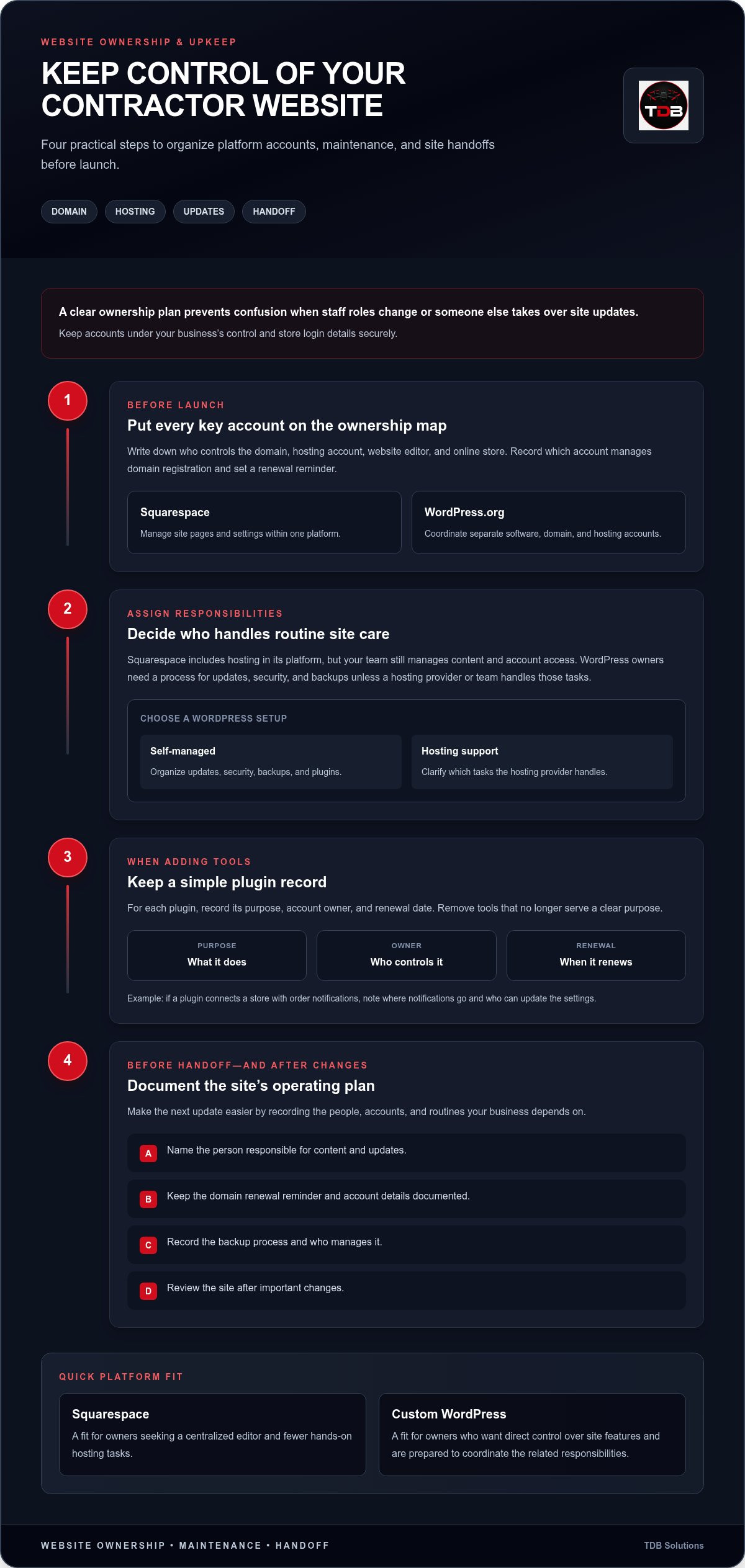
Your platform choice also affects who controls website accounts and handles routine decisions. Squarespace keeps site management within its platform, while WordPress.org involves separate components to coordinate. Before launch, document who controls the domain, hosting account, website editor, and online store.
Monthly Platform Responsibilities
Squarespace provides one platform for managing pages and site settings. WordPress.org uses separate software and hosting, so you coordinate access across accounts. This matters when a staff member changes roles or someone else takes over site updates. Keep accounts under the business’s control and store login details securely.
Set a reminder for your domain’s renewal date and record which account manages its registration. Where possible, keep the domain registrar account separate from individual employee accounts. A Houston roofing company, for example, should know who can update its contact page and who controls the domain settings if the original site administrator leaves.
Hosting, Maintenance, and Plugin Management
WordPress owners need a process for updates, security, and backups unless a hosting provider or team manages those tasks. Squarespace includes hosting in its platform, but you still manage content and account access. Assign a responsible person and document how the site will be reviewed after important changes.
Plugins add functions, but each one brings management tasks. Record its purpose, account owner, and renewal date. If a contractor uses a plugin to connect a store with order notifications, for example, document where notifications go and who can update the settings. Remove tools that no longer serve a clear purpose.
| Option | Account setup | Ongoing responsibilities | Useful fit |
|---|---|---|---|
| Squarespace | Manage site within the platform | Maintain content and account access | Owners seeking a centralized editor |
| WordPress.org, self-managed | Coordinate software, domain, and hosting accounts | Organize updates, security, backups, and plugins | Owners who want direct control |
| WordPress with hosting support | Coordinate the site with a hosting provider | Clarify which tasks the provider handles | Owners who want WordPress with assigned support |
Choose the setup that suits how your team will manage accounts, content, and store tasks. Before launch, document the account owner, renewal reminder, backup process, and person responsible for updates.
Which is better for a brand-new service-based business?
Squarespace can simplify setup for a basic contractor site, while WordPress suits owners who want more control. Neither platform guarantees mobile speed. Image size, scripts, page layout, and Core Web Vitals all matter. Core Web Vitals measure loading speed, interactivity, and visual stability.
Platform Differences for Service Businesses
Squarespace gives a new electrician or roofer a visual editor and ready-made templates. WordPress offers thousands of free and premium themes, with more options for custom features. Choose based on whether you prefer a managed editor or are prepared to handle more technical decisions to shape the site.
Start with the tasks your website needs to perform. A Houston HVAC contractor may need service-area pages, clear phone details, and a quote request form. A new remodeler may prioritize project galleries and separate pages for kitchens and bathrooms. Match these needs to platform features before choosing a template or commissioning a custom build.
Launch Speed and Mobile Performance
A template can help you assemble a first site quickly, while a custom WordPress build may require more planning for design and features. The launch timeline depends on content readiness, page count, revisions, and setup work. Prepare service descriptions, business hours, and project photos before building on either platform.
On a contractor’s mobile site, visitors should find the phone number, service area, and next step without searching through menus. Test the homepage and a service page on a phone. Make sure text is readable, buttons are easy to tap, and images do not crowd the main contact action.
Technical comfort matters after launch. Squarespace’s visual editor offers a direct way to adjust page content. WordPress allows broader customization, but owners may need to manage themes, plugins, and settings. Decide who will add a plumbing service page or replace an outdated project photo before choosing a platform.
Google can help customers find a local contractor, but choosing a platform does not guarantee visibility. Build useful pages around real services and locations, such as drain clearing in Pearland or roof replacement in League City. Keep business details consistent and make the contact step clear on each page.
Use this decision check: choose Squarespace if your first priority is assembling a straightforward site with less technical setup. Choose WordPress if you need custom page structures, added functionality, or more control over future changes. If mobile presentation is central to your launch, consider a custom mobile-first website built around clear service information and contact actions.
Website hosting and plugins
Yes. Squarespace and WordPress sites can connect with contractor CRM, scheduling, and payment tools through available integrations, plugins, or embedded features. The setup depends on the tool and the connection method it supports.
With WordPress, hosting and the domain are separate from the core software. Choose a hosting provider, connect your domain, then install WordPress through the provider or its setup tools. The hosting environment determines where site files and databases run. Organize access details so you can manage the site and renewals without losing control.
Squarespace includes hosting in its site platform, so you use a managed environment instead of configuring a separate WordPress host. The setup process differs, but good site management remains essential. A Friendswood electrician still needs accurate service pages, working contact details, and current business hours on either platform.
WordPress plugins add functions to a site. Yoast, for example, is an SEO plugin that can help manage page-level search settings. WordPress also offers thousands of free and premium themes. Compare a theme’s design and features with your actual needs before adding plugins to fill gaps.
Every plugin adds something to maintain. Before installing one, define the task it must perform, such as creating a quote form or connecting a CRM. Review its source, documentation, update history, and compatibility with your theme. Remove plugins you no longer need, and test key pages after making changes.
A contractor CRM organizes customer records, scheduling software handles appointments, and payment tools process transactions. On Squarespace, look for a supported integration or embed option. On WordPress, check for a compatible plugin or connection method. Test a booking submission on a phone and confirm the appointment reaches the intended system.
- List the required connections: CRM, booking calendar, payment processing, and lead forms.
- Check the handoff: Submit a test inquiry and confirm it reaches the correct inbox or system.
- Review the customer flow: Make sure a visitor can move from a service page to a request or booking without confusion.
For a roofing business serving Galveston, keep the customer journey simple: explain the service, collect the customer’s details, and route the inquiry correctly. A working technical connection still needs clear labels, useful form fields, and a confirmation message. Test these steps whenever you change a plugin, theme, or integration.
Website platforms for home-service lead generation
A trade website should guide visitors to a useful next step: calling, booking, or requesting a quote. Compare Squarespace and WordPress based on the pages, forms, and customer actions your business needs. For a new contractor, Squarespace vs custom WordPress web design for trade businesses comes down to how well each platform supports that journey.
For a single-location roofer, a focused homepage, service list, and contact form may cover the essentials. A company serving Houston, Pearland, and Galveston also needs clear service-area information. WordPress is open source and can support features such as online booking systems and service calculators. Squarespace offers a guided platform for building and managing pages.
Either platform can organize pages for a business serving multiple locations. WordPress may suit a company that needs custom page structures or location-specific functions. Squarespace can work when each area needs consistent information using its existing page tools. Make each location page useful by naming the service, explaining the coverage area, and providing a clear way to get in touch.
Useful lead-generation features include quote forms, online booking, service-area pages, and customer reviews. A quote form can ask for the job type, location, and preferred contact method. A booking tool can guide visitors to an appointment. Place reviews beside relevant services, and keep the next step visible on a phone.
Map the customer journey before choosing software. A League City electrician might guide visitors from an electrical repair page to a quote request. A Galveston HVAC company might place service-area details and its booking option near the homepage’s main contact information. These examples show how platform features can support practical customer journeys.
- Quote forms: Ask for details that help identify the job and respond to the inquiry.
- Online booking: Connect the appointment step to the scheduling process you use.
- Service areas: Name locations served and connect each page with relevant services.
- Reviews: Place customer feedback beside the service it describes.
WordPress allows more customization as requirements grow, while Squarespace can suit a straightforward site managed through its editor. A useful Squarespace vs custom WordPress web design for trade businesses comparison starts with your lead path: decide whether visitors should call, book, or request a quote, then test that action on a phone before launch.
Squarespace vs WordPress monthly hosting, maintenance, and plugin costs
The main ongoing difference is how much of the website your team manages directly. Squarespace keeps the site environment in one platform, while WordPress.org separates the software, hosting account, and optional plugins. For a Houston contractor, assign a clear owner to each part before launch. That way, staff know who can make changes or restore access.
Squarespace provides a central place to edit pages and settings. WordPress gives you more control over site setup, but your team needs a process for updates, security, backups, and plugin management. Decide who handles each task, how changes are reviewed, and where login details are stored. Keep business accounts accessible to authorized staff rather than tying them to one person’s private email.
Maintenance works best as a defined routine. Before publishing a service page, check its phone number, service area, form, and mobile layout. After changing a theme or plugin, test the homepage and the path to contact you. If your WordPress process includes backups, document who creates them and how the team would restore the site.
Plugins need active oversight, too. Give each one a defined purpose, such as connecting a contact form to a customer management system. Record who manages its settings and review whether it still serves a business need. If two plugins perform the same function, simplify the setup and test the remaining feature. This makes the site easier to operate and troubleshoot.
- Squarespace: Assign someone to maintain page content, account access, and site settings.
- WordPress.org: Assign owners for hosting access, security, backups, software updates, and plugins.
- Either platform: Test contact forms, booking paths, and key service pages after significant edits.
A Pearland electrician could assign one employee to update service descriptions and another to check that inquiries reach the right inbox. A written handover should identify account owners, record important settings, and explain how staff can publish approved changes. This process matters when employees change roles or a new web professional takes over.
Pick the platform your team can maintain reliably, then write down its operating routine. If you want a consistent visual identity across your website and customer materials, plan your branding and graphic design around the services customers need to recognize.
TDB Solutions: Construction Intelligence
TDB Solutions helps trade and construction businesses present clear project information through Construction Intelligence. If you need a new site with service information that works well on phones, its Custom Mobile-First Websites can support that goal. Marketing Media Production and Aerial Inspections can also help you share project visuals and document site conditions.
Consider this next step once you have chosen a platform but still need stronger content, project visibility, or a clearer mobile experience. A contractor, for example, can pair service information with project imagery that helps visitors understand the work and take action.
Contact TDB Solutions to discuss your website or construction information needs, or visit tdbsolutions.ai.
Build the next stage of your online presence
Choose between Squarespace and custom WordPress web design for trade businesses based on where you want your business to go, not just what you need on launch day. Consider the jobs you want to win, how customers will learn about your work, and which information you will need to keep current. That gives your website a purpose beyond simply being online.
TDB Solutions can connect your digital presence with the work behind your business. Its Custom Mobile-First Websites present service information clearly on phones. Construction Intelligence helps you present construction project information, while Marketing Media Production can bring project stories to life through professional media.
Choose a practical next step: identify the main outcome you want from your website, then shape its pages and content around that goal. If you’re ready to plan that next step, contact TDB Solutions about your website. A clear plan can help your business move forward with confidence.
Frequently Asked Questions
What should US contractors compare when choosing Squarespace or custom WordPress?
Compare the work each platform requires from your team, not just the initial design. List who will prepare service descriptions, provide project photos, approve page layouts, and update information after launch. Then note any required connections, such as a customer management system or appointment calendar. A Houston HVAC contractor can use this checklist to define responsibilities before choosing a platform or starting design.
Which platform is better for local SEO and Google Maps leads for plumbers, electricians, and HVAC companies?
Neither platform automatically improves local search visibility or brings leads from Google Maps. A plumber in Friendswood should keep business details accurate, explain the services offered, and make it easy for visitors to get in touch. An electrician can create separate pages for distinct services instead of grouping unrelated work together. Choose the platform that helps your team keep information current and present it clearly on mobile devices.


