

A commercial roof inspection drone in Texas can capture storm damage without putting an inspector on every roof section. The on-site flight typically takes 15-30 minutes, depending on roof size, and can gather high-resolution photos, video, thermal images, and data for photogrammetry. The result: a clearer view of visible roof conditions and areas that may need closer attention.
After a storm, you need useful documentation, not just a quick look from the ground. A commercial roof inspection drone in Texas can capture visible issues such as displaced materials, debris, and other defects. Thermal imaging may also reveal temperature patterns associated with moisture or insulation concerns that standard photos may not show.
This guide explains what a drone roof inspection involves, how its imaging methods work, and what storm damage they can help document. You’ll also learn how drone inspections support follow-up assessments and how to make the findings more useful for property decisions.
Key Takeaways
- Learn what a drone roof inspection captures and how a clear report can organize photos, observations, and recommended follow-up.
- See how high-resolution imagery, thermal imaging, and photogrammetry each contribute a different view of roof conditions.
- Recognize storm-related defects that aerial images can document and understand when a closer on-site assessment may be needed.
- Find out how organized photo and video records can help you compare roof areas and communicate findings to your team.
- Explore how TDB Solutions’ Aerial Inspections and Construction Intelligence can support clearer roof documentation and next steps.
What’s a drone roof inspection?
A commercial roof inspection drone in Texas uses an aircraft-mounted camera to document roof areas from above. For a commercial property, the flight can capture photos and video of surfaces, edges, rooftop equipment, and storm-related debris. A typical team roof inspection may take 45 minutes to an hour, while the flight itself can take 15-30 minutes, depending on roof size. Weather and safe access conditions shape when the aircraft can fly.
A drone inspection creates a visual record for assessment, not a hands-on test of every roof component. The operator plans flight paths to capture relevant details, then organizes images by roof section. That structure helps you connect an observation to a specific area instead of sorting through an unlabeled camera roll. For example, a report might group images by roof section, drainage area, perimeter, and rooftop equipment. A commercial roof inspection drone in Texas can capture these areas in a planned sequence.
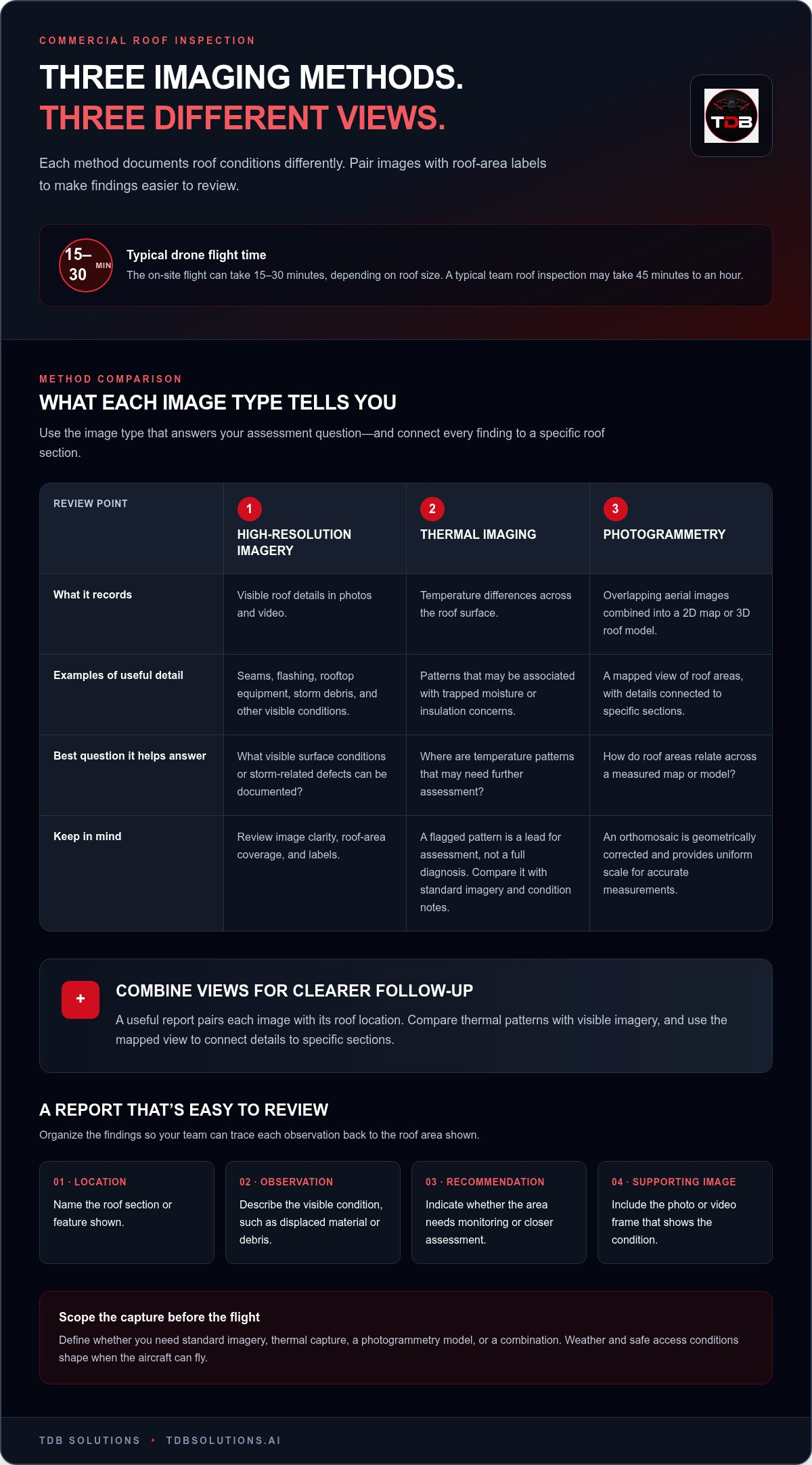
A useful report turns images into a clear next step. It can include:
- Location: the roof section or feature shown in each photo.
- Observation: a visible condition, such as displaced material or debris.
- Recommendation: whether the area needs monitoring or closer assessment.
- Supporting image: a photo or video frame that shows the condition.
To receive a section-organized photo report, set the requested format before the flight. Plan image folders by roof area, capture context and close views, then review and label the files in sequence. Report delivery depends on the capture scope and the time needed to review and organize the photos. Keep the report focused on visible conditions and specific locations.
If your insurance documentation uses Xactimate, organize aerial photos with clear roof-area labels and condition notes. These records can support claim documentation, but aerial images alone don’t create an Xactimate estimate or determine coverage. An estimator can use the documentation alongside the project’s other claim materials.
How do you choose a licensed and insured commercial roof inspection drone provider in Texas? Choose a provider whose pilots hold FAA Part 107 certification and carry full liability insurance. Ask for a sample report format that shows how it labels photos, roof sections, observations, and recommendations.
What factors shape the inspection scope in Texas? Roof size, access, weather, imaging needs, and requested report detail shape the work. Define the roof areas and deliverables before the flight so the capture plan matches your assessment needs.
Drone flight time and report delivery are separate parts of the schedule. A traditional roof inspection report may take 3-7 business days to arrive, while the flight captures the roof during the site visit. Set the delivery timing and file format when defining the inspection scope. That way, your team knows when to expect the photos, recommendations, and supporting documentation.
High-resolution imagery, thermal imaging, and photogrammetry
A commercial roof inspection can provide high-resolution photos, video, thermal imaging, and photogrammetry outputs such as roof models. A useful report pairs each image type with a roof location, helping you review conditions and identify areas for follow-up.
High-Resolution Imagery and Photogrammetry
High-resolution photos capture visible surface details, including seams, flashing, rooftop equipment, and storm debris. Photogrammetry combines overlapping aerial images to create a 2D map or 3D roof model. An orthomosaic is a geometrically corrected aerial image composed of many photos, providing uniform scale for accurate measurements. Review image clarity, roof-area coverage, and labels that connect model details to specific sections.
Thermal Imaging for Moisture Concerns
Thermal imaging records temperature differences across a roof surface. Those patterns can help flag areas associated with trapped moisture or insulation issues that standard photos may not reveal. For example, a thermal image might highlight a section that differs from nearby roof areas. Compare that location with visible imagery and the roof’s condition notes to guide further assessment.
Thermal Imaging for Energy Concerns
Thermal patterns can also help flag insulation concerns that may affect a building’s energy performance. Use the thermal image alongside standard photos to connect a temperature variation with its roof location and visible features. A flagged area is a lead for assessment, not a full diagnosis of building energy use. The report should make the location and observed pattern clear.
Each imaging method answers a different question. High-resolution imagery records visible conditions. Thermal imaging highlights temperature differences. Photogrammetry combines multiple views into a map or model. A drone may capture images and video, sometimes including thermal imaging. Organized outputs help you compare the same roof section across image types instead of treating every file as a separate finding.
For insurance claims, dated, location-labeled photos can help document visible roof conditions after a storm. Pair each image with a roof-area label and a concise observation. Keep thermal images distinct from standard photos, since they record different information. A claim file is easier to review when each image supports a specific observation and the report identifies areas needing closer assessment.
Before the flight, define whether you need standard imagery, thermal capture, a photogrammetry model, or a combination. Then organize the report by roof area and match each observation to its supporting image. If aerial documentation fits your property assessment, explore aerial inspection services for a practical next step.
Roof defects and storm damage visible in drone imagery
After a storm, aerial images give you a roof-level view of visible conditions across commercial buildings. High-resolution capture can document displaced roofing material, scattered debris, damaged flashing, or surface areas that differ from surrounding sections. Clear images help you identify where an issue appears and direct a closer assessment to the right location.
Review the roof systematically rather than scanning images at random. Start with the full-roof view, then compare detailed images of each section. Look for visible changes such as:
- Roofing material that appears displaced, lifted, or missing.
- Debris or branches resting on the roof surface.
- Flashing or edge details that look bent or separated.
- Visible punctures, tears, or irregular surface marks.
- Drainage areas where debris or standing water appears.
These are visual indicators, not a final diagnosis. A photo can show a surface mark, but it cannot reveal every underlying layer or establish how a membrane feels underfoot. Compare each suspected defect with nearby images and the roof’s overall condition. If one area looks different, record its location and image reference for follow-up.
Image quality shapes what you can assess. A wide view shows how a defect relates to surrounding roof features. A closer image helps distinguish a loose item from a damaged component. For example, a broad photo might locate debris near rooftop equipment, while a tighter capture shows whether nearby flashing also appears affected. Organized images help roofing teams return to the same section.
A roofing professional brings material and repair expertise to image interpretation. They can compare visible signs with the roof system, installation details, and reported storm conditions. If a drone image suggests an issue that needs close confirmation, a technician should inspect that location directly. This matters when a photo cannot show whether damage extends beneath the visible surface.
Use a simple review sequence: identify the roof section, note the visible condition, attach the supporting image, and assign follow-up. For example, label a photo “west roof edge” and describe the visible flashing condition rather than calling it a confirmed failure. That language keeps the inspection record factual and gives the roofing professional a specific area to assess.
For insurance documentation, preserve the original images and keep location labels consistent across the report. Pair each suspected storm condition with a clear photo and concise note. A drone record can support an assessment, but the contractor’s close inspection helps interpret defects that images alone cannot settle. That distinction keeps the evidence useful for buildings, property teams, and repair planning.
Close-up aerial photos and video documentation
Close-up aerial photos show specific roof areas, while video records how those areas relate across the surface. After a Texas storm, request both wide context and detail views. A wide frame locates the affected roof section; a close frame documents visible material displacement, debris, or surface marks.
Texas heat, storms, hail, and wind affect inspection timing and the conditions recorded. Houston summer roof surfaces regularly reach 140-160°F, while high winds and bad weather can prevent a drone flight. Hail and wind can leave visible roof conditions worth documenting once weather permits safe capture.
Build a useful photo sequence around the property, not a pile of unlabeled files. Start with the building overview, then capture each roof section and any suspected damage. Include nearby features, such as drains, edges, or rooftop equipment, so reviewers can orient themselves. Finish with close views of each visible concern.
For video, use a steady path that shows the roof layout and connects broad views with closer details. A pass over a damaged section can preserve context that a single still image lacks. Keep footage tied to a named roof area, such as the east edge or central equipment zone. That makes later review more direct.
For insurance claims, organize the original photos and video by roof area and capture date. Pair each file with a concise note describing what it visibly records. For example, label an image “north section, debris near drain” rather than assigning a cause the image cannot establish. Keep storm documentation distinct from later repair photos.
A clear record can support repair discussions by showing where a condition appeared and how it looked during the inspection. If roofing work is completed, capture the same roof sections afterward. Matching locations helps compare the documented condition with the repaired area and keeps the property record easier to follow.
Use this practical capture sequence for storm documentation:
- Record a full-roof view that establishes the building and roof layout.
- Photograph each section, including edges, drains, and rooftop equipment.
- Capture close views of visible damage, debris, or moisture indicators.
- Film a steady pass that connects each detail with its roof location.
- Organize files by section and add factual notes for claims review.
Thermal imaging can add a separate layer when moisture concerns need attention. Keep thermal files distinct from standard photos because they record different information. A visual image documents surface appearance; a thermal image records temperature patterns. Together, the organized files give reviewers separate views of the same roof area.
Storm documentation works best when each image answers a simple question: where is the condition, what does it look like, and which file supports the note? That structure helps property teams, roofing professionals, and claims reviewers discuss the same location without relying on memory.
Commercial drone roof inspection benefits
Drones can inspect flat, low-slope, and pitched commercial roofs when the flight path provides a clear view. Roof access, surrounding structures, rooftop equipment, and weather shape how thoroughly the camera can capture each section.
The main benefit is a broad visual record without placing an inspector on every roof area for an initial review. A flight can document roof sections, edges, drains, and equipment in a planned sequence. That gives property teams a consistent set of images to review before deciding which locations need closer attention.
Speed matters after a storm. The on-site flight typically takes 15-30 minutes, depending on roof size. Images can help teams identify possible concerns sooner, such as debris near a drain or displaced material along an edge. Weather still affects scheduling: high winds and bad weather can prevent a drone flight.
Organized drone capture keeps the inspection record from becoming a collection of disconnected images. Group photos by roof area, then tag each visible concern with its location. If a later review finds a possible issue near a rooftop unit, the team can return to that section in the report instead of searching through every file.
Thermal imaging adds another view. Temperature patterns can help flag areas associated with hidden moisture or insulation issues. Compare a thermal image with a standard photo of the same roof section. The paired views give a reviewer more context, while a technician can assess locations that need close confirmation.
Software can help analyze collected data and identify potential problems. Tagged locations also support follow-up inspections and repair planning. For example, a property manager can compare a documented roof area with later photos after repairs. Consistent section labels make changes easier to track across reports.
Drone imagery has limits. It records visible conditions, but it cannot determine by touch how roof decking or a membrane feels underfoot. A ladder or hands-on assessment may still be needed for close confirmation. Treat the aerial record as a way to direct attention, not as a replacement for every inspection method.
Use the findings to make a practical decision: document the condition, assign a follow-up, or arrange a closer assessment. Aerial inspection is useful when you need roof-wide visual documentation, storm records, or repeatable views of specific sections. It may not answer questions that require direct contact with roofing materials.
For commercial properties in the Houston area, a structured drone flight can turn roof observations into organized site records. Plan an aerial roof inspection when you need clear imagery to support assessment and follow-up.
TDB Solutions: Construction Intelligence
TDB Solutions provides Aerial Inspections and Construction Intelligence for property teams that need organized roof documentation. After a storm, aerial photos and video can help you track visible conditions by roof section and share clear records with the people planning follow-up. Construction Intelligence can also support ongoing project documentation, keeping site information useful beyond a single inspection. Turn to these services when you need an aerial view of a commercial roof or consistent visual records for a construction project. The right deliverables depend on what you need to assess, document, or communicate. Contact TDB Solutions to discuss your roof inspection needs.
Set Your Next Roof Review in Motion
Make your next roof decision easier by setting a documentation standard before another inspection is needed. Decide who will review the findings, how your team will organize records, and how you’ll connect roof observations with maintenance planning. A commercial roof inspection drone in Texas can support that process with visual information your team can revisit alongside other project records.
TDB Solutions connects aerial documentation with Construction Intelligence. If your work also calls for stronger project communication, Custom Mobile-First Websites and Marketing Media Production can help present project information clearly to customers and stakeholders. Choose the support that fits your next step, whether you’re documenting a property or improving how your business communicates its work.
Contact TDB Solutions about drone inspections to discuss your roof documentation needs. A clear next step can help your team move forward with confidence.
Frequently Asked Questions
Can you inspect after a storm?
Yes, a drone inspection can document roof conditions after a storm when weather allows the flight. High winds and bad weather can prevent a flight, so timing depends on conditions at the property. Once weather permits, the inspection can record visible debris or roof changes for later review. Keep the inspection record separate from repair documentation so you can distinguish observed conditions from completed work.
Do you follow drone flight regulations?
Yes. According to the Federal Aviation Administration, a remote pilot in command must hold a remote pilot certificate with a small UAS rating and satisfy § 107.65 requirements, subject to the exception in paragraph (c). TDB Solutions uses FAA Part 107 certified, fully insured pilots. For a commercial roof inspection, flight planning also accounts for site conditions and any permissions needed before the aircraft takes off.
How Does Pre-Inspection Planning Work?
Pre-inspection planning defines the roof areas to capture, the report format, and the information your team needs. The operator plans flight paths around relevant roof details, reviews weather, and prepares the site. For an occupied property, planning can include notifying people about the inspection and addressing privacy concerns before flying. A written scope can also align tasks, deliverables, and goals before the crew arrives.
How is this different from a roofer just walking my roof?
A drone provides overhead visual coverage, while a roofer walking the roof can make hands-on observations. The camera can document broad areas and hard-to-view features without putting an inspector on each section. A technician can assess physical characteristics that a camera cannot test, such as how a membrane or roof decking feels underfoot. These methods answer different questions and can complement each other during an assessment.
Is a drone survey safe for occupied buildings?
Planning helps account for people using the building during an inspection. Before flight, the crew can notify occupants, address privacy concerns, prepare the site, and plan a route around the roof features being documented. The inspection team also considers weather and site conditions. For example, a property manager can coordinate notice to staff before the scheduled capture, helping occupants understand where inspection activity will take place.
What Do You Do With The Data Collected?
Collected data can be organized, reviewed, and tagged to make findings easier to interpret. A report may connect an observation to its roof location, while software can help analyze imagery and identify potential problems. Keep original files organized by roof section, then share relevant records with the people assessing repairs or maintenance. Clear labels also help teams compare locations during later inspections without relying on memory.
What can drones identify?
Drones can document visible roof conditions and capture imagery that software can help analyze for potential problems. Thermal imaging can help flag temperature patterns associated with moisture or insulation concerns. The findings direct attention to specific areas rather than proving every underlying cause. For example, a flagged section can be matched to standard imagery and sent for closer assessment when the visible record raises a question.
What if there are airspace restrictions at the property?
Airspace restrictions can affect whether and how a drone flight proceeds. The operator reviews the property location, applicable permissions, and planned flight path before inspection. Those constraints shape the mission plan and capture area. Share the property address and inspection goals during planning so the team can account for the location and identify the steps required before scheduling the flight.


