
What can your boss see about a Pearland jobsite between scheduled visits? If progress lives in separate photos, text messages, field notes, and reports, it may take extra effort to understand what has changed. Convincing my boss we need better project tracking Pearland teams can rely on starts with making that visibility gap concrete, not asking for another layer of administration.
You already know tracking matters. The challenge is showing where the current process makes information hard to find or compare. A grading update captured in a site photo, for example, may not reach the people reviewing progress until later. In this article, you’ll learn how to build an evidence-based case from project records, compare practical tracking approaches, and propose a focused next step that fits your existing workflow.
That could mean clarifying what your current reports don’t show, setting a consistent review cadence, or adding regular aerial documentation and site progress reports alongside your project management tools. TDB Solutions provides construction intelligence in Pearland, including overhead site records that help teams review conditions between visits. The goal is clearer evidence for better-informed conversations, not a replacement for the systems your team already uses.
Key Takeaways
- Define tracking around the project questions your team needs to answer, then make task management and field documentation work together.
- Compare routine visits, team-submitted photos, project software, and aerial documentation by the visibility each provides and the effort each takes to review.
- For convincing my boss we need better project tracking Pearland, use examples from your project records to show where information gaps affect decisions.
- Make a focused proposal: identify the gap, present evidence, compare options, and suggest a practical next step that fits current workflows.
- Regular aerial documentation, site progress reports, volumetric measurements, and overhead oversight can add field context to project tracking.
Why Pearland Construction Projects Can Outgrow Basic Progress Tracking
A superintendent shares a site photo in a message. A project manager records a note after a visit. A crew lead mentions a change in a meeting, while the latest written update sits in a separate report. Each item may be accurate, but piecing them together takes time. Managers may still be unsure what changed since their last review.
That gap matters on a Pearland project when a decision depends on current field conditions. Imagine a team coordinating deliveries, access, and work around an active area. If updates don’t show what’s complete, what’s happening now, and what comes next, a manager may need to follow up before deciding how to sequence work. That doesn’t prove the schedule is slipping or the work has a quality issue. It shows the evidence may not be easy to review.
Project visibility is timely, organized evidence of field progress that helps the team understand current conditions and make informed decisions.
Signs Your Current Project Tracking Is Leaving Gaps
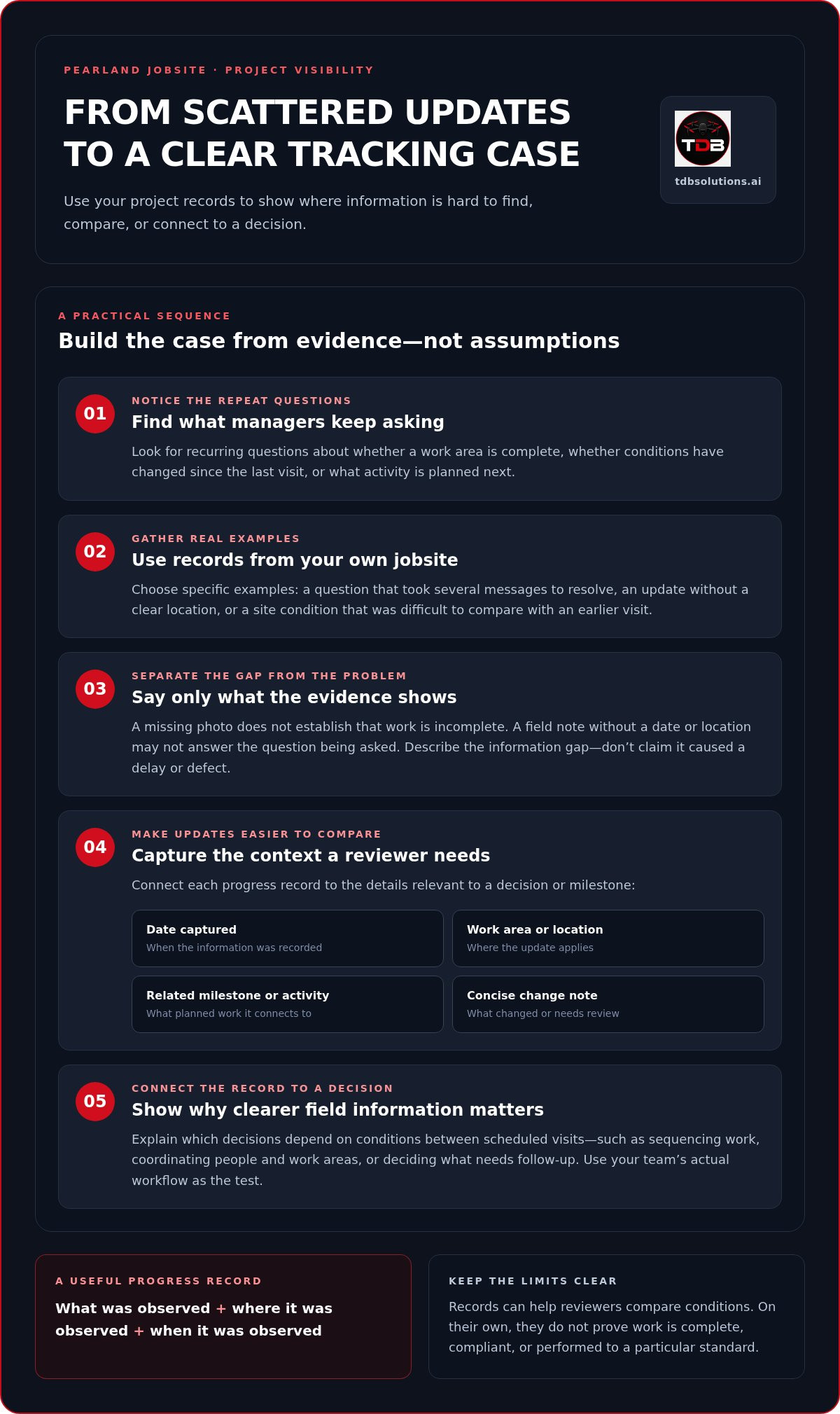
Look for recurring questions, not just missed milestones. Does someone have to ask whether a work area is complete, whether conditions have changed since the last visit, or what activity is planned next? Repeated follow-ups can signal that useful information exists but isn’t reaching the people who need it in a clear, consistent form.
Separate a recordkeeping gap from a project problem. A missing photo doesn’t establish that work is incomplete. A field note without a date or location doesn’t show that the crew did anything wrong. It means the record may not answer the question being asked. When photos use inconsistent angles, dates, or location descriptions, comparing updates becomes harder and reviewers may need more context to judge what changed.
For your case, collect examples from your own job records: a question that took several messages to resolve, an update that lacked a clear location, or a site condition that was difficult to compare with an earlier visit. Be precise about what the evidence shows. You’re documenting where the tracking process obscures information, not claiming poor documentation caused a delay or defect.
Why Managers Need Clearer Field Information
Managers use field evidence to assess sequencing, coordinate people and work areas, and decide what needs follow-up. A useful update connects an observation to its place and timing, then makes the relevant status easy to understand. That gives a manager more context than a photo or short note without explanation.
Keep updates concise. A manager reviewing several project responsibilities needs the key facts without searching through unrelated messages. Project management principles include coordinating work toward defined objectives. Timely field information helps managers connect plans with site conditions. Your case is strongest when you identify a specific question the current records cannot answer quickly and explain how clearer evidence could support the next decision.
Use your team’s actual workflow as the test. Which decisions depend on conditions between scheduled visits? Which update format can your manager review without interrupting field work? Answering those questions turns a general request into a practical discussion about visibility on your Pearland jobsite.
What Better Project Tracking Means for a Pearland Jobsite
Better project tracking doesn’t mean adding a new tool for its own sake. It means keeping consistent, reviewable records that answer real project questions: What changed in this work area? What condition needs follow-up? Which activity is coming next? The records should help the team make decisions, not create paperwork nobody uses.
Task management and field documentation serve different roles. Task management helps a team assign work, track responsibilities, and monitor status. Field documentation records what people can observe at the jobsite, such as visible progress or changing site conditions. Used together, they connect planned work with field context. A task may show that an activity is underway; a dated record can help a manager review what the site looked like at that point.
Dated, location-aware records make progress easier to review by showing what was observed, where it was observed, and when. They give your team a clearer basis for comparison. On their own, they don’t prove that work is complete, compliant, or performed to a particular standard.
Which Project Details Should Progress Records Capture?
Start with information tied to a decision or milestone. For a Pearland jobsite, a progress record might identify the visible work area, note a change since the previous update, and describe a relevant site condition. Keep descriptions factual. “Material staged near the east access area” is more useful than an unlocated photo with a broad caption.
When available, connect each record to:
- The date the information was captured
- The work area or location it shows
- The related project milestone or activity
- A concise note explaining what changed or needs review
This structure helps managers compare records without treating images or notes as independent proof of completion, quality, or compliance. Choose fields your team can maintain consistently.
How Aerial Documentation Adds an Overhead View
Repeat aerial photography can provide a consistent overhead perspective for reviewing how visible site conditions change over time. It may help a team see the relationship between work areas, access routes, staging, and surrounding site activity in a way that individual ground-level photos may not. The aerial record supports oversight; it doesn’t replace site management, field judgment, or task coordination.
Reports and volumetric measurements can add context when they match a project’s needs. For example, a team may want a regular visual record for progress review or measurements relevant to a particular earthwork question. Define the question first, then decide which records will help answer it. Construction intelligence drone data can form part of that field documentation while existing project software continues to manage tasks. To make the case for better tracking in Pearland, describe how the records would support your team’s decisions and consider how aerial documentation for construction projects could fit the workflow.
Compare Construction Tracking Options Before You Pitch a Change
No single tracking method answers every construction question. A site visit gives direct observations. Team photos capture specific moments. Project software organizes tasks and status. Aerial documentation adds an overhead view. For a Pearland project, compare these options by the information your team needs, how consistently it can collect that information, and the effort required to review it.
| Method | Visibility | Consistency | Review effort | Questions it can help answer |
|---|---|---|---|---|
| Routine site visits | Direct view of conditions during the visit | Depends on visit timing and notes | May require written summaries or follow-up | What did the team observe on site? |
| Team-submitted photos | Close view of selected areas | Depends on when, where, and how teams submit them | Can take time to sort and compare | What does this specific area look like? |
| Project software | Organized view of entered tasks and status | Depends on timely team updates | Can make task information easier to review in one place | Who owns a task, and what status has the team recorded? |
| Aerial documentation | Overhead view of visible site conditions | Can support comparisons when captured on a planned cadence | Requires reviewing records across dates | How has the visible site layout or work area changed? |
When Routine Site Visits and Photos Are Enough
Site visits and ground-level photos remain useful for direct observation, quick updates, and focused checks. A supervisor can inspect a specific work area, speak with the crew, and record what needs follow-up. These methods may be enough when the question concerns a defined location or a condition someone can readily observe. Their limitation is scope: people who weren’t there may have less context between visits, especially when they need to understand how separate areas relate.
When Aerial Progress Documentation Adds Value
Aerial records can add context when a site is broad, its visible layout changes, or managers need to compare progress across dates. An overhead view may help show how work areas, access, or staging relate across the site. It won’t replace project software, site visits, or the judgment of your field team. Use it alongside those tools to answer questions that a task list or close-up photo may not resolve.
Aerial records add a useful view when your existing updates need broader site context or a consistent way to compare visible conditions over time. Consider what your manager needs to see, then match the method to that question. Routine visits and photos can document specific observations; software can track tasks; overhead records can add site-wide visual context.
Present the comparison as a fit-for-purpose choice, not a demand to replace current tools. Identify one real information gap, show which method could help address it, and propose how it could work with the team’s existing updates. You can include construction tracking options in that focused review.
Build a Boss-Ready Case for Better Project Tracking
A strong proposal doesn’t start with a new system. It starts with a project question your current records don’t answer clearly. Keep the discussion tied to one Pearland job, the decisions your manager already makes, and evidence your team can review together.
Use this four-step sequence:
- Identify the gap. Name the information that’s difficult to find, compare, or review, such as the latest condition in a work area.
- Show evidence. Bring relevant examples from actual project records, such as a message thread needed to clarify an update or photos that lack consistent dates or locations.
- Compare options. Explain which approach could address the gap and how it would fit alongside current site visits, team updates, and project software.
- Propose a next step. Suggest a bounded discussion around one project, define what better visibility should help the team assess, and set a review date.
Connect the proposal to a decision on your boss’s plate. If a manager needs to coordinate upcoming activity, explain how clearer field records could help them review current conditions before discussing sequencing or follow-up. Don’t promise that a new recordkeeping method will prevent delays. Show how it may give the team relevant information for a decision it already needs to make.
Turn Tracking Problems into a Clear Business Case
Pair each observed gap with its practical effect. For example: “The latest photos don’t identify the work area, so the reviewer needs clarification before comparing progress.” Keep facts distinct from interpretation. Label what the records show, what you estimate the extra follow-up involves, and what clearer documentation may improve. That discipline makes your case credible without relying on unsupported industry statistics.
Prepare for Common Manager Objections
If your manager worries about adding process, show how a focused record could attach to an existing report or review instead of creating a separate routine. If they question aerial data, explain its specific role: it can provide overhead documentation of visible site conditions, but it doesn’t replace field supervision, project software, or professional judgment. Keep the proposal about a project need, not a broad technology overhaul.
Set a clear review point before the discussion ends. Agree on what question the added information should help answer, who will review it, and when the team will decide whether the approach fits. You don’t need to claim success in advance. You need a practical way to evaluate whether the records make the chosen project question easier to assess.
Build your case from your own project evidence and a defined next step. Review construction intelligence options for your project to see how aerial documentation and site progress reporting can support the tracking discussion.
How TDB Solutions Supports Better Project Visibility in Pearland
Once you’ve identified what your team needs to see and how managers will use that information, consider whether regular aerial documentation fits the gap. TDB Solutions provides construction intelligence for Pearland projects, including aerial records, site progress reports, volumetric measurements, and overhead oversight. These services add field context to existing project tracking. They don’t replace project management software or the decisions made by your site team.
The right approach starts with the project question. Do managers need a consistent overhead record to review visible changes across the site? Would a progress report help them discuss current conditions? Does a project need volumetric measurements for a specific purpose? Defining the need helps shape useful documentation and a reporting approach that fits your team’s workflow, rather than adding records without a clear use.
What to Expect from Construction Intelligence Support
TDB Solutions’ construction intelligence combines regular aerial documentation with site progress reports and overhead oversight. Volumetric measurements can support project needs where relevant. Together, these records give construction teams additional information to review site conditions and discuss progress. They support decision-making, but they aren’t proof of completion, workmanship, or compliance on their own.
Flights are performed by FAA Part 107 certified pilots. Founder Dillon Bates brings over 10 years of survey experience. Deliverables typically arrive within 24-48 hours of the flight, giving your team a defined timeframe for receiving the resulting records. The aerial information can sit alongside existing reports, task tracking, and field observations, so your team can use each source for the questions it answers best.
Before discussing the approach with your manager, identify the Pearland project or work area, the reporting gap you want to address, and the decision clearer visibility should support. Consider who will review the records and how they’ll fit into current reporting. A focused scope gives the discussion a practical boundary and helps your team judge whether the added field perspective is useful.
Choose a Practical Next Step for Your Pearland Project
Bring a specific example from your project records. Explain what information was hard to review, then describe the kind of documentation that could add context. If your manager wants to avoid a larger process change, present aerial records as a focused supplement to the tools and site routines already in use.
A clear project question can move the conversation from a general request to a practical evaluation. Discuss construction progress tracking for your project with TDB Solutions, and outline the site, visibility gap, and decisions your team wants to support.
Make Your Next Project Review More Informed
Turn the tracking conversation into a working habit. Choose one upcoming project review and decide what field information would help your team discuss the work more clearly. Then note what proved useful, what remained unclear, and whether the added records fit the way your team already communicates.
That gives you a practical basis for the next conversation with your boss. You’re not asking the team to change everything at once. You’re proposing a deliberate way to see whether better project visibility supports the decisions that matter on your Pearland jobsite.
If you’re still considering how to make the case for better project tracking in Pearland, keep the next step focused on your project’s needs and the field information your team wants to review. TDB Solutions can help you discuss an approach that fits those needs.
Plan a project visibility discussion with TDB Solutions and take the next step toward clearer, more useful construction progress reviews.
Frequently Asked Questions
How do I explain to my boss that our construction project needs better tracking?
Show how a specific information gap affects a decision your boss must make. For example, bring a recent question about whether a work area is ready for the next activity and show what it took to resolve. Then suggest a focused way to make that decision easier to assess. Keep the discussion tied to one project and evidence your team already has, rather than relying on broad claims about construction delays.
Can aerial progress documentation work alongside project management software?
Yes. To keep the process manageable, agree on a simple handoff: where the aerial files will live, who will share them, and how the team will point reviewers to the relevant record. For example, use a shared project folder and a consistent file-naming convention. That makes it easier for team members to find the right documentation without creating a second task log or changing how they assign work.
What should a construction progress update include?
Make the update easy to scan by leading with its purpose: routine status, an exception, or a decision that needs attention. A practical format can give each update a short headline, a concise explanation, and a clear next action when one is needed. Keep background detail out of the headline. That helps readers distinguish an ordinary progress note from an item that calls for discussion or follow-up.
How can a manager compare site photos with aerial documentation?
Compare the records against a specific review question rather than expecting different image types to match perfectly. For example, ask whether the images help clarify how visible site activity relates to a particular work area. Note what the records can show, what remains unclear, and whether a field check is needed. This keeps the comparison useful without treating either image as proof of completion or workmanship.
Who benefits from regular construction site progress reports?
People who coordinate, review, or communicate project progress can benefit when reports give them a shared reference for discussion. A project manager might use one to prepare for a coordination meeting; a superintendent might use it to bring a site condition to the team’s attention. Before setting up a reporting routine, identify its intended readers and the decisions or conversations it should support. That keeps reporting relevant to the team.
How soon can a construction team receive aerial documentation after a flight?
TDB Solutions’ deliverables typically arrive within 24-48 hours of the flight. Before capture, choose who will review the documentation and which upcoming project discussion it should inform. That preparation helps the team make practical use of the records when they arrive.


