
What if the best video for your website isn’t the most polished one, but the one that answers a visitor’s next question? Planning video content for business website pages can feel tricky. You need a format that fits your business, earns attention without slowing the page, and makes your expertise clear. The right video has a job to do.
This guide will help you choose videos that address real customer questions, place them where they support understanding and action, and plan content you can use across your website and other channels. You’ll see how business-owner interviews can put a face to your expertise, while aerial footage can give visitors useful context about a property, site, or business.
You’ll also learn how to fit video into a mobile-first page, keep performance in mind, and make each clip clear and credible. TDB Solutions produces website and marketing videos, including mic'd up business-owner interviews and drone footage, alongside custom mobile-first web design. Here’s how to make video work for your visitors and business goals.
Key Takeaways
- Choose video content for business website pages based on the question visitors need answered, not on format alone.
- Match interviews, service explainers, process footage, or aerial video to the page’s purpose and next step.
- Place video where it clarifies the page, and avoid autoplay or competing calls to action that can distract visitors.
- Plan each video around a page goal so the script, visuals, and call to action stay focused.
- Use business-owner interviews and drone footage to make your expertise and business context clearer to website visitors.
Why Put Video Content on a Business Website?
A visitor lands on your website with a question. What does your service involve? Who will they work with? What happens after they reach out? A clear video can answer these questions by letting people see a process, place, or person instead of asking them to imagine it from text alone.
Effective website video gives visitors useful visual information that fits the page’s purpose and helps them understand a business, service, or next step. A clip shouldn’t sit on a page just because it looks polished. It should clarify something the visitor needs to know. The broad idea of Video covers many formats, but a business website needs a format selected for a specific communication goal.
What should a business website video help visitors understand?
Start with questions people ask before they call or fill out a form. They may want to understand what a service includes, how work moves from one stage to the next, who leads the business, or what a finished project typically involves. Video can make these answers easier to follow by pairing a spoken explanation with relevant visuals. The written page still provides detail; the video gives those details a human voice and a visible setting.
Consider a Houston-area service business explaining its inspection process. A short owner interview could clarify what the team looks for and what a customer can expect from the next conversation. Footage of the work environment can provide context that a paragraph alone may not convey. Keep the example grounded: explain the process without promising a specific result for every customer.
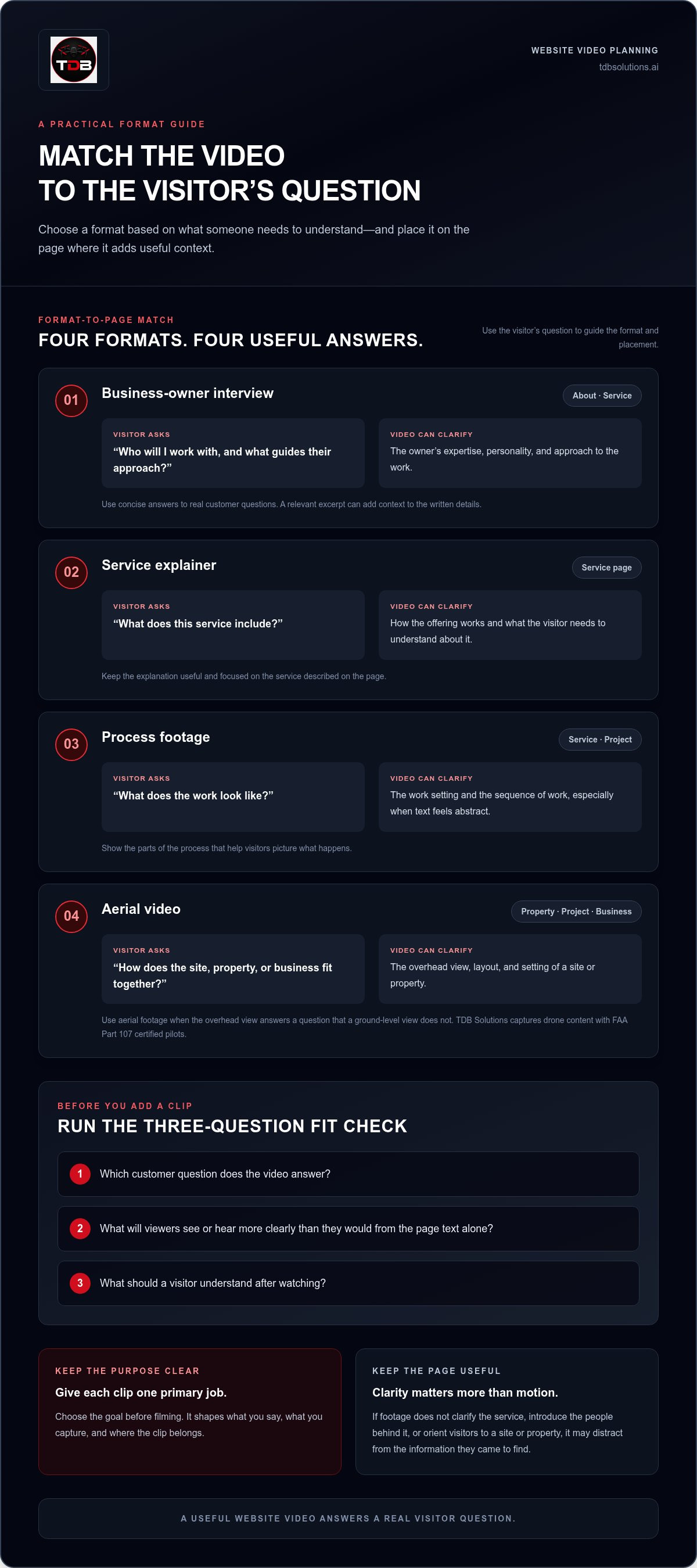
Before you add a clip, ask:
- Which customer question does it answer?
- What will viewers see or hear that the page’s text doesn’t explain as clearly?
- What should a visitor understand or do after watching?
Decorative footage may add motion, but motion alone doesn’t resolve a question. If a video doesn’t clarify the service, introduce the people behind it, or orient visitors to a site or property, it may distract from the information they came to find.
Which business goals can website video support?
Give each clip one primary job. A service explainer can educate visitors about how an offering works. A mic'd up business-owner interview can build familiarity by letting people hear the owner describe their approach in their own words. Process footage can make the work setting easier to picture. A concise closing prompt can guide interested viewers toward an inquiry.
Education and promotion can work together, but they aren’t the same thing. An educational video answers a practical question first. A promotional video asks viewers to take action. If you combine both goals, keep the explanation useful and make the next step direct, such as inviting visitors to inquire about the service described.
Choose the goal before filming. It shapes what you say, what you capture, and where the clip belongs on the page. That focus makes video content for business website visitors more useful than a generic brand montage. Give the video a clear purpose, then let the visuals support it.
Which Video Format Fits Each Website Page?
Choose a format by starting with the page and its visitors, not with a video trend. Someone on an About page may want to meet the people behind the business. A service-page visitor may need a clear explanation of what happens next. Match the video to that question, then place it where it adds context.
Use this comparison to narrow your options. The call to action should follow the video’s purpose and the visitor’s likely next step.
| Video format | Visitor question | Page fit | Useful next step |
|---|---|---|---|
| Business-owner interview | Who will I work with, and what guides their approach? | About page or a relevant service page | Learn about the service or make an inquiry |
| Service explainer | What does this service include? | Service page | Request more information |
| Process footage | What does the work look like? | Service page or project page | Ask about the process |
| Aerial video | How does the site, property, or business fit together? | Property, project, or business page | Explore the details or contact the business |
When does an owner interview fit the website?
A mic'd up business-owner interview works when visitors need to hear the expertise and personality behind a service. Use concise answers to real customer questions, such as what the process involves or how the business approaches a project. Skip the rehearsed sales monologue. Place a relevant excerpt on an About page or service page, where the owner’s explanation adds context to the written details.
When do process footage and aerial video add useful context?
Process footage helps visitors picture the sequence of work, especially when a written description feels abstract. Aerial video fits when an overhead view clarifies a property, site layout, or business setting. TDB Solutions captures drone content with FAA Part 107 certified pilots. For more ideas on planning commercial media, see the guide “Marketing Video Production Houston: Commercial Media Buyer Guide (2026).”
Keep the edit focused on what the page needs to explain. A sequence of work can orient a visitor; an overhead view can establish location and layout. Don’t add aerial footage just for dramatic motion if the ground-level view already answers the question. The U.S. Chamber of Commerce also shares practical ways to use website video, which can help you consider formats beyond a standard introduction.
Before choosing, check that the format fits the visitor’s question, the page’s role, and the next action you want to make clear. TDB Solutions connects marketing video production with mobile-first web design. Explore TDB Solutions’ video and website services to see how these services can work together.
Will Website Video Slow Your Site or Distract Visitors?
It can, if you add video without considering how the page loads and behaves. A relevant clip can make a service easier to understand. An oversized embed, unexpected sound, or slow-loading player can get in the way of reading and taking action. The content creates value; implementation determines how it affects the experience.
Video’s message helps visitors understand your business; the way you load and place it affects page performance. Keep the clip close to the information it explains, and don’t let it compete with the page’s main action. A service video beside a clear inquiry path has a purpose. An autoplaying background video that pushes contact information down the page may create friction instead.
How can a video support the mobile experience?
Design for the small screen first. Use a responsive player that fits the available width, and keep the surrounding layout easy to scan. Visitors should be able to find service details and a contact path without hunting below or around the video. Add captions so people can follow the message with audio off, and make sure text remains readable on a phone.
Loading behavior matters, too. Avoid making a large video file load before a visitor needs it. Lazy loading can defer video loading until someone chooses to play it, which helps keep the initial page lighter. Check the page on a phone as well as a desktop: look for delayed content, shifting elements, or controls that are difficult to tap.
How do you keep a video from interrupting the visitor?
Let people choose to watch. Turn off autoplay, especially autoplay with sound, so motion doesn’t interrupt someone who came to read. Give the player a descriptive title that explains what the clip covers, such as “How our inspection process works.” That tells visitors why the video deserves their attention before they press play.
Keep one primary action in focus. If a service page aims to prompt an inquiry, don’t surround the video with several competing buttons. Place the relevant contact option beside or below the player, and make sure the video doesn’t obscure service information. The goal is a clear path, not another decision visitors must decode.
Use Google’s core web vitals as a practical performance check. These metrics track loading, interactivity, and visual stability. Google’s “good” thresholds are a Largest Contentful Paint of 2.5 seconds or less, Interaction to Next Paint of 200 milliseconds or less, and Cumulative Layout Shift of 0.1 or less. A page passes when at least 75% of real-user visits meet the good threshold for all three metrics. These signals help you assess the page experience; they don’t replace checking whether the video serves a visitor need.
Review every video page on mobile and desktop. Confirm that the clip loads only when appropriate, captions are available, and the next step stays easy to find. That’s how you make video content for business website visitors useful without letting it slow the page or pull attention away from what matters.
How to Plan Website Video from Page Goal to Final Cut
A focused video starts with a page, not a camera. Decide what visitors need to understand and what action the page should support. That goal guides the format, script, interview prompts, visuals, and closing call to action. Use this workflow to keep production on track from the first idea through the final review.
- Choose the page. Pick a specific destination, such as a service page, About page, or property page. Avoid trying to make one video fit every part of your website.
- Define the visitor’s question. State the question in plain language. A Houston-area contractor’s service page, for example, might need to explain what happens during an initial site visit.
- Select a format. Choose an owner interview, service explainer, process footage, or aerial video based on what will answer that question most clearly.
- Plan the message and visuals. Draft a short outline, identify who should speak, and list the places, tools, or work steps viewers need to see. Keep the page’s main action in mind.
- Produce with the page in view. Capture the interview or footage needed for the intended page. For a business serving Friendswood, Pearland, or League City, use local settings only when they help explain the service or establish relevant context.
- Review the edit in context. Watch the finished video on the page, not only as a standalone file. Check that the message, layout, and next step work together.
How do you prepare a useful video brief?
Write down the target page, intended audience, key question, core message, and next step. Then list the people, locations, products, or processes the viewer should see. For an owner interview, prepare short prompts that invite specific answers, such as “What should a customer expect after requesting this service?” Clear prompts help the owner speak naturally without turning the conversation into a rehearsed pitch.
Keep the brief practical. Note the details the video must explain and leave out material that doesn’t help answer the visitor’s question. For related guidance on structuring pages around visitor needs, see Houston Web Design: Mobile-First Conversion Guide 2026.
What should you review before publishing?
Compare the final cut with the brief. Does it answer the intended question? Does it fit the page’s purpose? Check caption accuracy, audio clarity, mobile presentation, and the copy around the player. Read the page as a visitor would, both before and after watching. The service details should remain easy to find, and the call to action should still make sense after the video ends.
A clear workflow turns video content for business website pages into a planned part of the visitor experience, rather than a clip added at the last minute. TDB Solutions brings website design and marketing video production together. Learn about TDB Solutions’ website video services.
How TDB Solutions Creates Video Content for Business Websites
Your website video should reflect how your business works and what customers need to know. TDB Solutions produces website and marketing video content for commercial businesses, including mic'd up business-owner interviews and drone footage. Interviews put your expertise and personality into your own words. Aerial views help visitors see a property, site, or business in context.
Start with the page’s purpose. A service page may call for an owner’s explanation of the work. A commercial property page may need an overhead view that makes the setting easier to understand. Keep the message focused on that page and give viewers a clear reason to watch.
What does TDB Solutions bring to a website video project?
TDB Solutions creates marketing media for websites, advertising, and social media. A mic'd up interview can help you explain your approach in a direct, natural way. Drone content can add visual context to a business, property, or site. Use footage that supports the story, then pair it with page copy that connects what viewers see to the service you offer.
Video production can also work alongside website design. If your page needs a layout that makes room for video while keeping service details and contact options easy to find, TDB Solutions builds custom mobile-first websites. The video and the page should work together on both a phone and a desktop.
How can Houston-area businesses take the next step?
If you serve customers in Houston, Friendswood, Pearland, Galveston, or League City, start with three details: the page where you want to use video, the audience question you want to answer, and the people, place, or work you want viewers to see. Those specifics give the project a clear direction.
You might want an owner interview that explains your approach or aerial footage that gives visitors a better view of a commercial property. Define the page’s purpose and the next step you want visitors to take so the video fits your website.
TDB Solutions produces business-owner interviews and drone video, and builds custom mobile-first websites for businesses in the Houston area.
Make Your Next Website Video Count
Your next step doesn’t need to be a full video campaign. Pick one page where visitors could use a clearer explanation, then decide what you want them to understand or do. That focused starting point gives your video content for business website visitors a practical role from the beginning.
As your services, team, or projects change, revisit the page and ask whether its video still answers the right question. A well-planned clip should fit the current message, support the page’s purpose, and leave visitors with a clear path forward. Keep that standard in view as you plan new content, and video becomes part of a useful website experience rather than an add-on.
TDB Solutions can help you shape website video around your business and the people you serve. Plan your website video with TDB Solutions. Start with one page, one audience question, and a clear message.
Frequently Asked Questions
Does adding video to a business website help SEO?
Video can support SEO, but adding one doesn’t guarantee better rankings. Help search engines interpret the clip by giving it a clear title and relevant page context. You can also add VideoObject structured data and include the video in a video sitemap. Check that the page provides useful information even if a visitor doesn’t play the video, and monitor how search engines index the page over time.
How long should a video on a business website be?
Make the video long enough to answer its specific question, then stop. A single service detail may need only a brief explanation, while a walkthrough of several steps may take longer. Write down the points viewers must understand and edit out anything that doesn’t serve them. If the topic needs more explanation than fits comfortably in one clip, split it into focused videos or use the page copy for added detail.
Should a business website video autoplay?
Usually, no. If you use a decorative background clip, keep it secondary to the page’s message and don’t rely on it to communicate essential details. For a video with spoken information, make the play control obvious and let visitors choose when to start. Also check that the player’s controls remain available and usable on the devices your customers use to browse your site.
Can I use a YouTube video on my business website?
Yes. A YouTube embed can make a video available on a page without requiring you to build a playback system yourself. Consider the tradeoff: the embedded player can introduce platform branding and links that lead viewers away from your site. Keep your own service information and contact path close to the video, and test the embed on mobile before publishing.
Do website videos need captions?
Captions help make spoken content accessible and easier to review. Treat them as part of the finished video, not an automatic afterthought. Check names, specialized terms, and any words that could change the meaning if transcribed incorrectly. A separate transcript can also help visitors scan the full explanation, quote a detail, or find the information they need without replaying the clip.
Should every service page have its own video?
No. Give a page its own video when that service has details, terminology, or a process visitors can’t get from a general company introduction. For closely related services, one shared video may work if the page clearly explains which parts apply to that offering. Avoid making duplicate clips that differ only in their opening line; use the page copy to spell out the meaningful distinctions.
Can drone footage work on a local business website?
Yes. Drone footage can suit a local business when the property’s layout or setting is easier to understand from above. A commercial site with several buildings, outdoor areas, or a distinctive location may benefit from an aerial perspective. For a Houston-area audience, use location-specific details in the surrounding page text so visitors can connect the footage to the business they’re considering.


