

A slow phone site can lose a contractor lead before a customer sees your work. If you’re asking why your contractor website is so slow in Pearland, the cause may be oversized photos or video, chat widgets, and form scripts that load before the page is ready. Google’s stated target is for a page’s main content to appear within 2.5 seconds, but speed alone doesn’t secure rankings.
You’re right to focus on mobile performance. A slow site can frustrate visitors trying to call, request a quote, or view your services. Slow loading and unresponsive controls can also make the page harder to use.
This article explains how mobile load times, chat widgets, form scripts, and core web vitals affect contractor websites. You’ll learn what can slow a page, how Google’s page experience fits into rankings, and which practical improvements can help Pearland customers reach your business.
Key Takeaways
- Identify how oversized images and video can delay the content Pearland customers need to see first.
- Learn why chat widgets and form scripts can slow a page, and how to prioritize essential features.
- Understand how Google’s page experience and core web vitals relate to visibility without treating speed as a ranking guarantee.
- See how a mobile-first website can make it easier for potential customers to view your services and contact your business.
Mobile website load times for local contractors
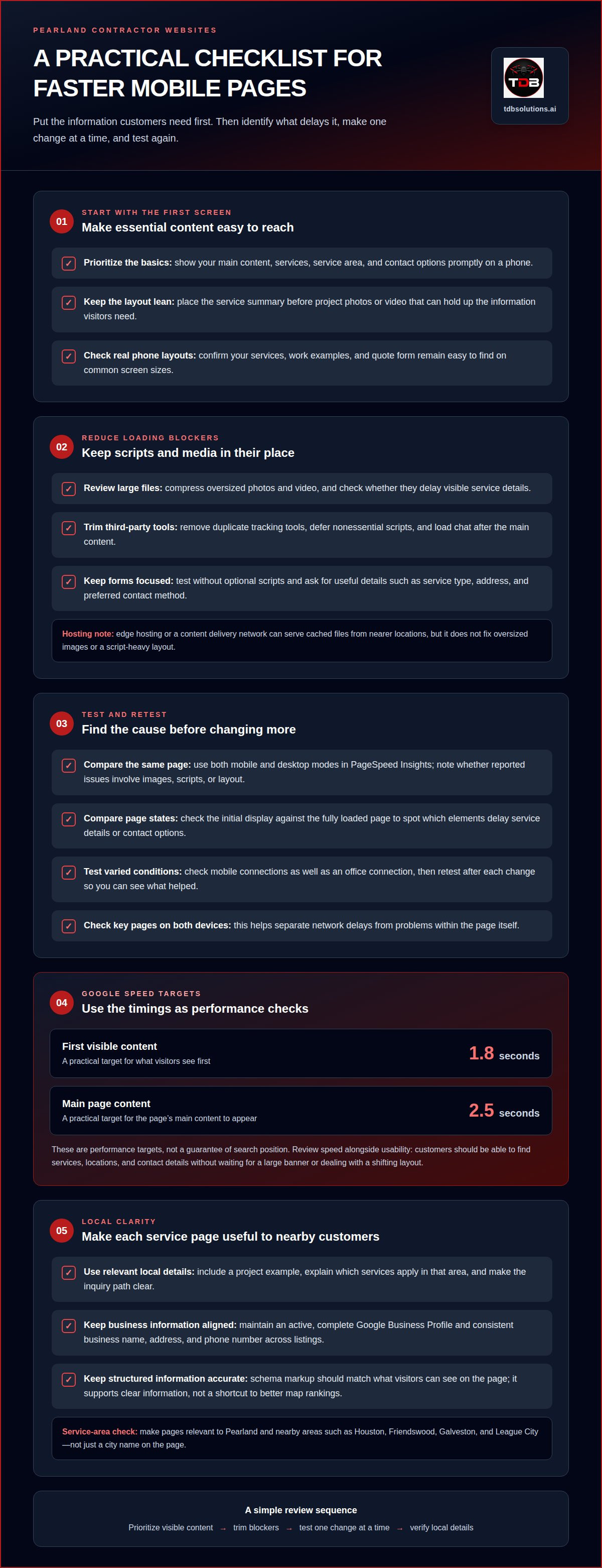
On a phone, your homepage should quickly show its main content, services, and contact options. If a Pearland customer sees a blank screen while a large photo or video loads, they may leave before finding your phone number. A lean mobile layout puts your service area, work examples, and quote form within easy reach. Check that these elements remain visible on common phone screen sizes.
Speed supports local visibility, but it doesn’t replace useful service information. Construction owners should make each page describe the work, locations served, and next step. Brazoria County has 548 construction firms, while the eight-county Houston metro has more than 11,882. Clear web design helps a Pearland business explain its difference without crowding the layout with competing messages.
Start by identifying which page elements delay the information visitors need first. Compare the page’s initial display with its fully loaded state, then prioritize files that hold up service details or contact options. For example, keep project photos below the main service summary on a construction page.
Compare desktop and mobile performance by testing the same page in both PageSpeed Insights modes. Review the reported issues and note whether they involve images, scripts, or layout. Retest after each change so you can tell which adjustment helped, rather than changing several elements at once.
Pearland customers use different devices, carriers, and signal conditions, which can affect loading. These factors don’t create a separate local search rule. Test your page under varied mobile connection conditions, not only on an office connection.
Make nearby-city service pages useful beyond mentioning the city name. Include a relevant project example, explain which construction services apply there, and make the inquiry path clear. A Pearland homeowner should see locally relevant details, while visitors from Houston, Friendswood, Galveston, or League City should find information suited to their area.
Chat widgets and form scripts that delay content
A chat widget may request code from an outside network before visitors can use it. Form builders, scheduling tools, and tracking scripts add more requests. When a Houston homeowner opens a contractor’s page on a phone, these tools can compete with service details and contact options for loading priority. Keep scripts only when they support a clear task, such as requesting an estimate.
Reduce delays in a clear sequence: remove duplicate tracking tools, load chat after the main content, and test the form without optional scripts. Keep required fields focused on useful details, such as service type, address, and preferred contact method. A shorter form can also make it easier for Pearland customers to submit an inquiry.
Edge hosting and a content delivery network can serve cached files from locations closer to visitors across the Houston region. This can shorten the distance static files travel, but it won’t fix oversized images or a script-heavy layout. Review page weight and third-party requests alongside hosting settings.
Contractors handling contents packout and storage can use the same approach on specialized service pages: put the service explanation and inquiry form first, and load a gallery or scheduling tool only when it supports that page. A homeowner looking for packout details shouldn’t have to wait for unrelated scripts.
For a practical speed review, identify scripts that block visible content, then defer nonessential tools. Compress oversized media, simplify the mobile layout, and retest each key page on a phone and desktop. This helps distinguish network delays from problems within the page itself.
If script conflicts or mobile layouts keep slowing key pages, mobile-first website design can help organize content and conversion features around what visitors need first.
Google's page experience and speed thresholds
Google sets practical speed targets for what visitors see. The first visible content should appear within 1.8 seconds, and the page’s main content should appear within 2.5 seconds. These measures help you assess whether a mobile visitor can reach a Pearland roofing service page quickly. They’re performance targets, not a promise of a specific search position.
Google’s page experience guidance says its core ranking systems seek to reward content that offers a good page experience. Strong scores alone don’t guarantee top rankings. Review speed alongside usability: a homeowner should be able to find roofing services, service areas, and contact details without waiting for a large banner or dealing with a shifting layout.
For local map visibility, keep your Google Business Profile complete and active. Make sure your website clearly describes your services and service areas. Keep your business name, address, and phone number consistent across your profile and other listings. This helps connect local searches with accurate business information.
Schema markup adds structured information to a website’s code. For example, a contractor can mark up a service page with details that match the visible content. Treat schema as support for clear information, not a shortcut to better map rankings. A retail business and a roofing contractor need accurate, relevant descriptions rather than copied markup that misrepresents their work.
Use this review sequence: test the mobile page against Google’s 1.8-second and 2.5-second targets, confirm visible service details, then compare the website with the Google Business Profile. Fix mismatched service areas and outdated contact details. Keep each page useful to local searches, with clear wording for Pearland and nearby locations.
Mobile website load times and lost leads
Yes. A slow contractor website can cost you inquiries when visitors leave before reaching your services or contact form. It can also weaken page experience, which Google says its core ranking systems consider, though good scores alone don’t guarantee top rankings.
The path to an inquiry matters. A Pearland homeowner searching for roof repairs needs to see the service, service area, and a clear way to request help. If a large banner loads first and pushes the phone number below the screen, the visitor must wait or scroll. Each extra step adds friction between the search and the inquiry.
Speed is a foundation, but conversions also depend on focused content and a usable mobile layout. Put the main service and contact option near the top. Keep forms direct, label fields clearly, and don’t make visitors search through galleries before they can act. A roofing page should make repair services easy to find, not bury them under unrelated project photos.
Use a simple review process to connect page performance with lead flow:
- Test the pages customers use most, including service pages and contact forms.
- Record when the main content appears and whether buttons respond promptly.
- Submit a test inquiry on a phone, then note any delay or confusing step.
- Fix the largest barrier first, then repeat the same test.
The HTTP Archive’s 2025 Web Almanac found that 62% of websites loaded their main content within 2.5 seconds on phones, using real Chrome visitor data from July 2025. That benchmark gives you context, not a guarantee of leads. Your results also depend on service relevance, clear local information, and a form that works.
Make mobile speed part of your lead-generation review, not a one-time technical task. Improve your mobile website experience with a focused review of key pages and conversion steps.
TDB Solutions: Custom Mobile-First Websites
TDB Solutions builds Custom Mobile-First Websites for contractors whose mobile pages load slowly, hide key services, or make inquiries difficult. The design can focus on a clear page layout, compressed media, and forms that help visitors request a quote without unnecessary steps.
Turn to TDB Solutions when routine fixes haven’t resolved slow loading or your site needs a stronger mobile foundation. A focused redesign can put service details, Pearland coverage, and contact options where customers can find them. Marketing Media Production can also add business-specific visuals to your website content.
For construction companies, a fast, usable website should make it easy to understand your services and take the next step. Contact TDB Solutions to discuss your website needs.
Make Your Website the Next Step Forward
Use your website as an active part of winning work, not just a place to list services. If you’re still asking why your contractor website is so slow in Pearland, look at the whole experience: how your expertise appears, how your work is presented, and how easily customers can start a conversation.
TDB Solutions offers Custom Mobile-First Websites to help contractors present services clearly on phones. Marketing Media Production brings project work into online content, while Construction Intelligence provides construction teams with project information and site insight. Each service addresses a different business need, so focus on the gap that matters most to your company.
Start with the pages that represent your work and help customers get in touch. A clearer online presence gives people a more direct path from discovering your business to understanding what you do.
Contact TDB Solutions about website speed to discuss a practical next step. Your next customer should be able to see the quality of your work and reach you without friction.
Frequently Asked Questions
Does website speed affect Google rankings for a contractor?
Yes. Speed can contribute to page experience, which Google’s ranking systems consider, but it doesn’t determine rankings by itself. A fast page still needs useful service information and a strong match for the search. For example, a Pearland roofing page should clearly describe roofing work, rather than relying on speed to appear in unrelated construction searches.
How fast should a contractor website load on a phone?
Judge a page by when it becomes usable, not only by when every background asset finishes downloading. On a phone, confirm that the main service and contact action appear promptly and that the call or estimate button works when tapped. Test a service page as well as the homepage, since galleries, maps, and embedded tools can affect loading.
What are the most common causes of slow contractor websites?
Large media files, third-party scripts, and code that blocks page rendering often contribute to slow pages. A contractor’s site might load a large project gallery, chat tool, and several tracking tags together. If you’re asking why your contractor website is so slow in Pearland, review the browser’s network waterfall to see which files take longest and which requests begin before visible content appears.
What do Google PageSpeed Insights and core web vitals scores mean?
Google PageSpeed Insights reports performance findings for a page, while core web vitals focus on loading, interactivity, and visual stability. A score is a diagnostic signal, not a ranking position or a forecast of leads. For example, a page can show its main content quickly but still shift buttons as it loads. Review individual issues, then prioritize fixes that affect visitors.
How do oversized images, videos, and fonts slow down a contractor website?
Large images and videos require more data to download, especially on mobile connections. Multiple font files can add requests and delay text styling. A roofing gallery with full-resolution images may load slowly before a visitor reaches the estimate button. Resize images to fit their display area, compress files, and avoid loading video until a visitor chooses to play it.
Can website hosting, server location, or poor web design cause slow loading?
Yes. A slow server response can delay every page element, while a cluttered design may trigger unnecessary scripts and requests. Hosting location can affect how far data travels, but it’s only one factor alongside server setup, caching, and page weight. If the same lean page loads slowly across devices, investigate hosting; if only one page lags, inspect its design and assets.


