

What does a nearby customer see when they open your website on a phone: a clear next step, or a menu they have to fight? For Houston-area businesses, mobile website design for local business should help people quickly find your services, the areas you serve, and how to reach you. If those details are hard to find, a responsive template alone may not solve the problem.
A site that adjusts to a smaller screen is only the starting point. Mobile visitors also need simple navigation, readable content, pages that load without unnecessary delay, and clear ways to call or send an inquiry. A polished desktop design won’t help much if customers in Friendswood, Pearland, Galveston, or League City can’t find what they need on their phones.
This article explains how to shape a mobile experience around your customers’ next steps. You’ll learn what information to prioritize, how to make contact options easy to use, and how to decide whether a template or a custom mobile-first website fits your business. TDB Solutions provides custom web design, branding, and marketing media production for businesses in the Houston area.
Key Takeaways
- Build mobile website design for local business around the details customers need to act, including relevant services, service areas, and contact options.
- Use responsive layouts, readable text, touch-friendly controls, and simple navigation to make browsing on a phone easier.
- Compare responsive templates, customized templates, and custom mobile-first websites by how well each supports your content and page goals.
- Review your most-used pages on a real phone, testing navigation, images, forms, phone links, and map links.
- Align page structure, graphic design, and business content to create a consistent mobile experience.
Why mobile website design matters for Houston-area local businesses
A potential customer might check your website while comparing options, sitting in a parking lot, or planning a service visit. They need to understand what you do and whether you serve their area without pinching, zooming, or searching through menus. If the phone experience creates friction, a visitor may decide to call another business instead.
Mobile website design for local business means planning the site around phone screens and touch interactions. It connects useful information with the actions visitors want to take. That requires more than shrinking a desktop site to fit a smaller display. It means deciding what visitors should see first and how they’ll find the next step.
What does mobile-first website design mean for a local business?
Mobile-first design starts with the tasks people need to complete on a small screen, then adapts the layout for larger screens. Each element should answer a visitor’s question: a service description answers “Can you help?”, a service-area detail answers “Do you serve my location?”, and a contact control provides a next step. What is Responsive Web Design? explains how layouts adapt across screen sizes.
Shrinking a desktop layout can leave tiny text, crowded columns, and controls that are awkward to tap. Mobile-first design plans the phone experience around real visitor tasks before expanding it for larger screens. Use that as a practical design standard, not as a promise of rankings or leads.
What do nearby customers need to find quickly?
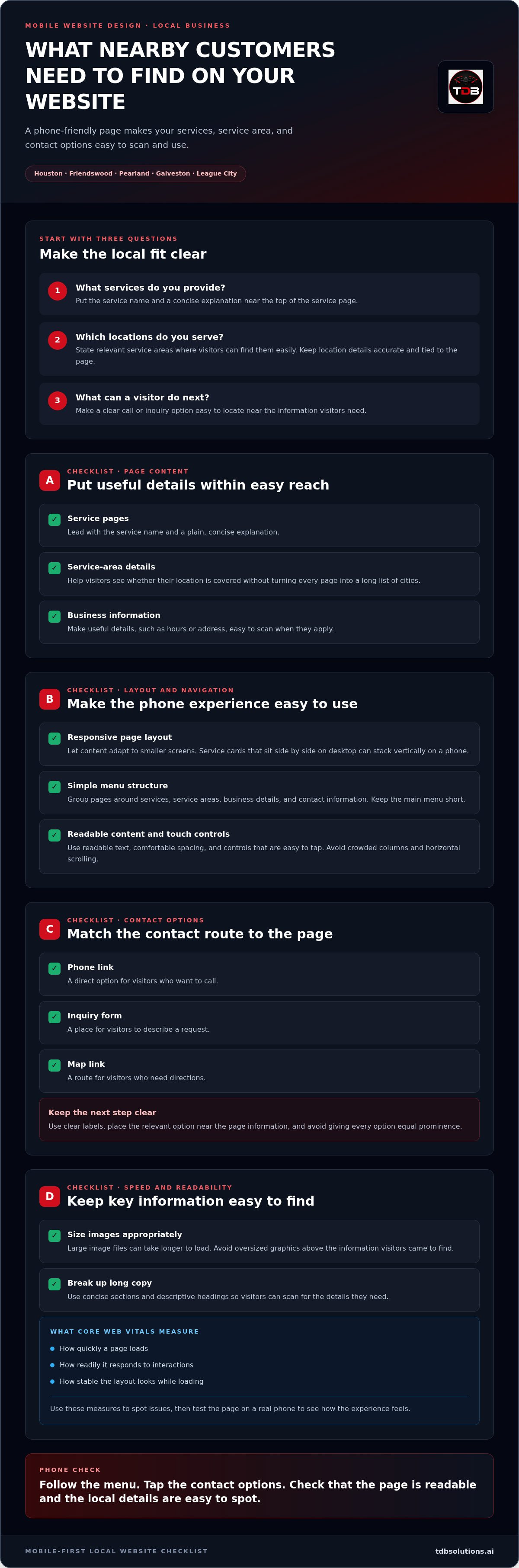
Start with three questions: What services do you provide? Which locations do you serve? What should a visitor do next? Use plain service descriptions, a focused service-area statement, and a visible way to call or inquire. Local details should help people assess fit, not turn every page into a long list of city names.
For example, a business serving Friendswood and League City can name those locations on its service-area page and explain which services are available there. A Houston visitor can then see whether the business works in their part of the metro. Keep location details relevant to the page and accurate to your coverage.
- Service pages: Put the service name and a concise explanation near the top.
- Location details: State the areas served where visitors can find them easily.
- Business information: Make useful details, such as hours or address, easy to scan when they apply.
- Contact route: Place a clear call or inquiry option near the information visitors need to decide.
Compare two experiences. In one, a visitor opens a crowded menu, struggles to read a wide page, then searches for a phone number buried in the footer. In the other, the page answers the main question, makes local fit clear, and puts the next step within easy reach. The second experience respects the visitor’s time and creates a direct path from service information to inquiry.
How mobile website design works: layout, navigation, and speed
A mobile site works well when its layout, menu, content, and contact options fit the way people use a phone. Responsive design lets the same page adapt to different screen widths. For example, three service cards arranged side by side on a desktop can stack vertically on a phone, keeping each title and description readable without horizontal scrolling.
That flexibility helps, but the details matter. Use readable text, leave enough space between sections, and make controls comfortable to tap. Put the most useful information near the top of each page, then guide visitors through supporting details in a clear order. A mobile website design for local business should make each page easy to scan and use.
How should mobile navigation and calls to action work?
Group pages around customer questions, such as services, service areas, business details, and contact information. Keep the main menu short, and make the primary contact option easy to locate without letting it crowd the screen. A phone link suits visitors who want to call; an inquiry form gives people a place to describe a request; a map link helps visitors get directions.
Match the contact option to the page. A service page might place a call or inquiry link near its explanation, while a location page can pair service-area details with directions. Clear labels tell visitors what will happen when they tap. Avoid giving every button equal prominence, or the next step becomes harder to spot.
How do speed and readability affect the phone experience?
Large image files can take longer to load, especially on pages with several images. Use appropriately sized images and avoid placing oversized graphics above the information visitors came to find. Break long copy into concise sections with descriptive headings. This makes the page easier to scan and keeps key information easy to locate as it loads.
core web vitals measure how quickly a page loads, how readily it responds to interactions, and how stable its layout looks while loading. These measures can help identify problems, such as a contact button that responds slowly or text that shifts as images appear. They complement direct phone testing: a measurement can flag an issue, while trying the page shows how it feels to a visitor.
For more context on how mobile design can support action, explore TDB Solutions’ Houston mobile-first conversion guide. Then review your own pages on a phone: follow the menu, tap the contact options, and notice whether images or layout shifts interrupt the task. TDB Solutions’ mobile-first website design connects page structure with clear business content.
Is a responsive template enough for a Houston local business?
It can be. A responsive template may suit a business with a focused set of services, a few standard pages, and one clear way for customers to get in touch. But responsive behavior only means the layout adjusts to different screen sizes. It doesn’t automatically make the content easy to understand, the navigation useful, or the contact path clear.
Choose an approach based on what visitors need to do, what your content requires, and how your brand should appear. A site for one core service may need a different structure from a business with several distinct services and inquiry paths. Judge the fit by testing real tasks on a phone, not by looking at a design preview.
When can a responsive template meet the need?
A simpler site may work well with a home page, a services page, an about page, and contact details. If each page answers a clear customer question, a standard template can be a practical starting point. Check that the phone layout keeps headings, service descriptions, and contact options in a useful order. Then try the actions a customer would take, such as finding a service and sending an inquiry.
| Approach | Flexibility | Best fit |
|---|---|---|
| Responsive template | Uses a preset layout that adapts to screen size | A small, standard page set with straightforward content |
| Customized template | Adjusts selected elements within an existing structure | A business that needs more brand fit or tailored page details |
| Custom mobile-first website | Plans page structure and mobile experience around the business | Distinct services, content needs, or customer inquiry paths |
When does custom mobile-first web design make sense?
Custom design can help when each service needs its own explanation or next step. One page might guide a visitor toward a project inquiry, while another explains a separate service. A deliberate page structure lets you organize those journeys instead of sending every visitor through the same layout.
Branding matters on small screens, too. Consistent colors, type, and graphic design connect your logo, page headings, buttons, and other visual details. The goal is a coherent experience, not decoration for its own sake. For more on building a recognizable local identity, explore business branding in Houston.
To choose mobile website design for local business, match the site structure to the visitor journey: what people need to learn, which page answers their question, and what action follows. TDB Solutions creates custom mobile-first websites and branding for Houston-area businesses. Explore TDB Solutions’ mobile-first website design to see how page structure and visual identity can work together.
How to review your local business website on a phone
A useful mobile-site check means completing a real customer task on your phone, from finding a relevant service to reaching the right contact option. Don’t rely on a desktop preview or a quick glance at the homepage. Test the pages and actions that matter to your customers, then note where the experience slows them down.
Which pages and actions should you test first?
Start with your homepage, core service pages, service-area information, and contact page. Use a real phone and follow the steps a potential customer would take. For a local service, try this sequence:
- Open the homepage and identify what the business does without searching through the menu.
- Find a core service and check whether the description explains what it includes.
- Look for a relevant service-area detail, such as coverage in Pearland or Friendswood.
- Use the contact option. Tap the phone link or complete the inquiry form on your phone.
- If the site lists a business location, tap its map link and check that it opens the correct destination.
Check each page as a visitor, not as someone who already knows where everything is. Can you tell what to do next? Does the form fit the screen, accept input comfortably, and show a clear confirmation after you submit a test inquiry? Does a phone link open the calling function with the correct number? Test these details directly.
How can you check mobile usability across screen sizes?
Repeat the same journey on another phone size or in a different orientation where practical. Watch for text that becomes too small, buttons that overlap, content that gets clipped, and forms that require sideways scrolling. Notice whether images load before or after the text you need to make a decision.
Record each problem by page and describe the task it interrupts. For example: “Service page, the inquiry button is hard to tap,” or “Contact page, the map link is difficult to find.” Fix blockers first: broken links, unreadable service information, unusable forms, and contact actions that don’t work. Then make visual refinements that help people scan the page.
This review gives mobile website design for local business a clear test: can a nearby customer find the right information and complete the next step without getting stuck? Recheck the same journey after making changes, especially on the pages customers use most. That shows whether your updates fixed the friction you found.
If your review reveals deeper layout or navigation issues, work with TDB Solutions on a custom mobile-first website designed around your business content and customer journey.
TDB Solutions’ mobile-first web design for local businesses
TDB Solutions creates custom mobile-first websites and branding for businesses in Houston, Friendswood, Pearland, Galveston, and League City. The goal is practical: organize your pages so visitors can understand your services, find useful business information, and reach the next step on a phone. Your site’s structure, visual identity, and content should support the same customer journey.
Founder Dillon Bates brings more than 10 years of survey experience. That background informs a detail-focused approach to planning and organizing website content, while your site’s design reflects your actual services, audience, and goals.
What can TDB Solutions bring to a mobile website project?
Custom mobile-first web design gives your content a structure planned for phone use, rather than simply compressing a desktop layout. TDB Solutions can align page order, service information, and inquiry paths with what customers need to understand. In-house graphic design supports a consistent visual identity across page elements, while marketing media production can add relevant business content to your website.
These elements work best together. A clear page hierarchy helps people move through your information. Consistent branding ties the experience together. Relevant media can add context for your work without pushing essential details out of view. Keep the customer’s task at the center of each design decision.
What should you prepare before discussing a redesign?
Gather the information that will shape your site’s content and structure. You don’t need a finished sitemap. A working list can clarify what customers need to find and which pages should guide them toward an inquiry, call, or other next step.
- Primary services: List each service and the questions customers commonly ask about it.
- Service areas: Identify the locations you serve, such as Houston, Friendswood, Pearland, Galveston, or League City.
- Visitor actions: Note whether people should call, send an inquiry, request information, or take another clear step.
- Brand assets: Gather your logo, colors, existing graphic design, and other materials that represent your business.
- Website content: Collect current page copy and examples of customer questions the site should answer.
These details connect the page structure to real customer needs and keep the design grounded in your business. They also provide a starting point for coordinating content and visual choices across the mobile experience.
If you’re ready to discuss a mobile website project, contact TDB Solutions about your website goals. Share what your current site makes difficult, which services or locations need clearer pages, and what you want visitors to do. You can discuss a mobile-first website and branding approach tailored to your business.
Make your next website decision count
Your next step doesn’t need to be a full redesign plan. Choose one mobile task you want to make easier, then use it to guide decisions about your site’s structure, content, and visual direction. A focused goal gives you a practical way to judge whether each design choice helps your customers.
Thoughtful mobile website design for local business turns a broad digital project into clear decisions about what visitors should see and do. Build on what already works, address the friction you’ve found, and shape the site around your business needs.
Ready to turn that goal into a practical plan? Talk with TDB Solutions about your mobile-first website and discuss the next steps for your business.
Frequently Asked Questions
Is a mobile-friendly website the same as a mobile-first website?
No. A mobile-friendly website can adapt an existing desktop layout for phones, while mobile-first design prioritizes phone users’ content and tasks from the beginning. Both can work well. To assess your site, check the first screen on a phone: can a visitor identify your main service and a useful next step, or do desktop-oriented elements push them out of view? This quick test can show whether responsive behavior meets your needs.
Can I make my current website mobile-friendly without replacing it?
Often, yes. If your site’s platform and structure support layout changes, you may be able to adjust page widths, text size, navigation, images, and buttons without rebuilding the whole site. First identify the specific problems on your phone, then see whether updates fix them across key pages. If the structure makes basic tasks difficult or limits necessary content changes, a rebuild may be more practical.
How can I test my local business website on different phone sizes?
Use actual phones with different screen sizes when you can, and repeat the same task on each: find a service, locate relevant business details, and try the contact route. A browser’s responsive preview can help you inspect additional screen widths, but it doesn’t replace tapping links and entering form information on a device. If you serve Houston, Friendswood, Pearland, Galveston, or League City, check that the location information answers customers’ questions in those areas.
Does a local business need a separate mobile website URL?
Usually not. A responsive website can present the same pages at one URL and adapt their layout to the visitor’s screen. A separate mobile URL can mean maintaining another version of your content and checking that both versions stay accurate. For most local businesses, one well-structured site is simpler to manage. Before creating a separate mobile experience, check that your existing site works clearly on phones, tablets, and desktop screens.
Can mobile website design support customers who use tablets?
Yes. A responsive layout can adapt to tablet screens as well as phones and desktops. Check how the page changes at intermediate widths: a two-column layout may have room on a tablet but feel cramped on a smaller device. Test both portrait and landscape orientations where practical. Make sure menus, forms, and contact links remain easy to use, and that content doesn’t become too stretched or crowded.
Should a small local business build a mobile app instead of improving its website?
For many small businesses, improving the website is a useful first step because customers can visit it without downloading an app. Consider an app when customers have a recurring task that benefits from a dedicated app experience, such as regularly using an account or service feature. If visitors mainly need to learn about your services, check your business details, or contact you, prioritize a clear mobile website before adding another digital channel.


