

A polished logo can’t rescue a website that leaves prospects guessing. Website design for contractors Houston businesses need should make services, project experience, service area, and contact options easy to find, especially on a phone. A generic site can make skilled work look interchangeable. A clear, mobile-first site gives local prospects useful proof and a simple path to the next step.
Your website should reflect the quality of your work, but knowing which improvements matter most can be difficult. Start with clear service pages, relevant project examples, and visible contact options. These help Houston-area prospects understand what you do and where you work, from Friendswood and Pearland to Galveston and League City. Original aerial photography, business-owner interviews, and consistent graphic design can also give your online presence a more personal, professional feel. TDB Solutions creates custom mobile-first websites and marketing media for local contractors, bringing those pieces together so your site communicates your expertise on desktop and mobile.
Key Takeaways
- Strong website design for contractors Houston businesses can use makes services, project experience, and contact options easy for prospects to find.
- Give your website a clear page structure, with distinct service pages that answer specific customer needs.
- Match buyer questions to useful content, including project examples, service-area details, and straightforward ways to get in touch.
- Plan around your customers: organize services, gather accurate project details and approved images, then review every page on mobile.
- Bring your online presence together with custom mobile-first web design, graphic design, aerial photography, and business-owner interviews.
Why Houston Contractors Need a Website That Explains the Work
Your crews can deliver careful work in the field, but a generic website may leave prospective customers unsure what you do. If visitors can’t tell which services you offer, what kinds of projects you take on, or how to reach you, your site isn’t carrying its share of the business-development work. Strong website design for contractors Houston companies can use starts with a simple goal: explain the work clearly, then make the next step easy.
A contractor website is a sales and trust resource that explains your work, backs it up with relevant proof, and guides the right prospects toward contact. That means more than an attractive layout. The principles of web design include how content, structure, and visual presentation work together. For a contractor, each choice should help visitors understand your services and move through the site without confusion.
What should a contractor website help a prospect understand?
Answer the questions a customer is likely to have before calling. Describe each service in plain terms, explain who it suits, and clarify the types of projects it covers. For example, a page about commercial renovations should state that focus directly instead of making visitors infer it from a broad “construction services” label. Keep distinct services on distinct pages so visitors can find relevant details quickly.
Then explain what a prospect can expect when they get in touch. Describe the steps in your actual process, such as an initial conversation, a site visit, or a proposal. Add proof that relates to the work: project photos, a concise description of the scope, and the location or project type when appropriate. Stick to verifiable details. A project example can demonstrate experience without promising the same result on every job.
Why local context matters for Houston-area contractors
Houston-area prospects need to know whether you work where their project is. Name the communities you serve in a dedicated service-area section or alongside relevant service details. For example, a contractor serving Friendswood might identify Houston, Friendswood, Pearland, and League City as service locations, then clarify practical boundaries or project types that affect coverage. Use locations that accurately reflect your business, not a string of city names repeated across every page.
Specific local context helps visitors decide whether to contact you before they fill out a form or pick up the phone. Pair service areas with useful details, such as the services available there or examples of nearby work you have permission to share. Keep directions for the next step visible, too: a clear phone number, a contact form, or a request-a-bid option can guide interested prospects. Make location information easy to scan on mobile as well as desktop.
Use your website to answer, not obscure. When services, project evidence, local coverage, and contact details work together, visitors can judge whether your company fits their needs and what to do next. That clarity gives your field work a stronger first impression online.
Build a Contractor Website Around Services, Projects, and Proof
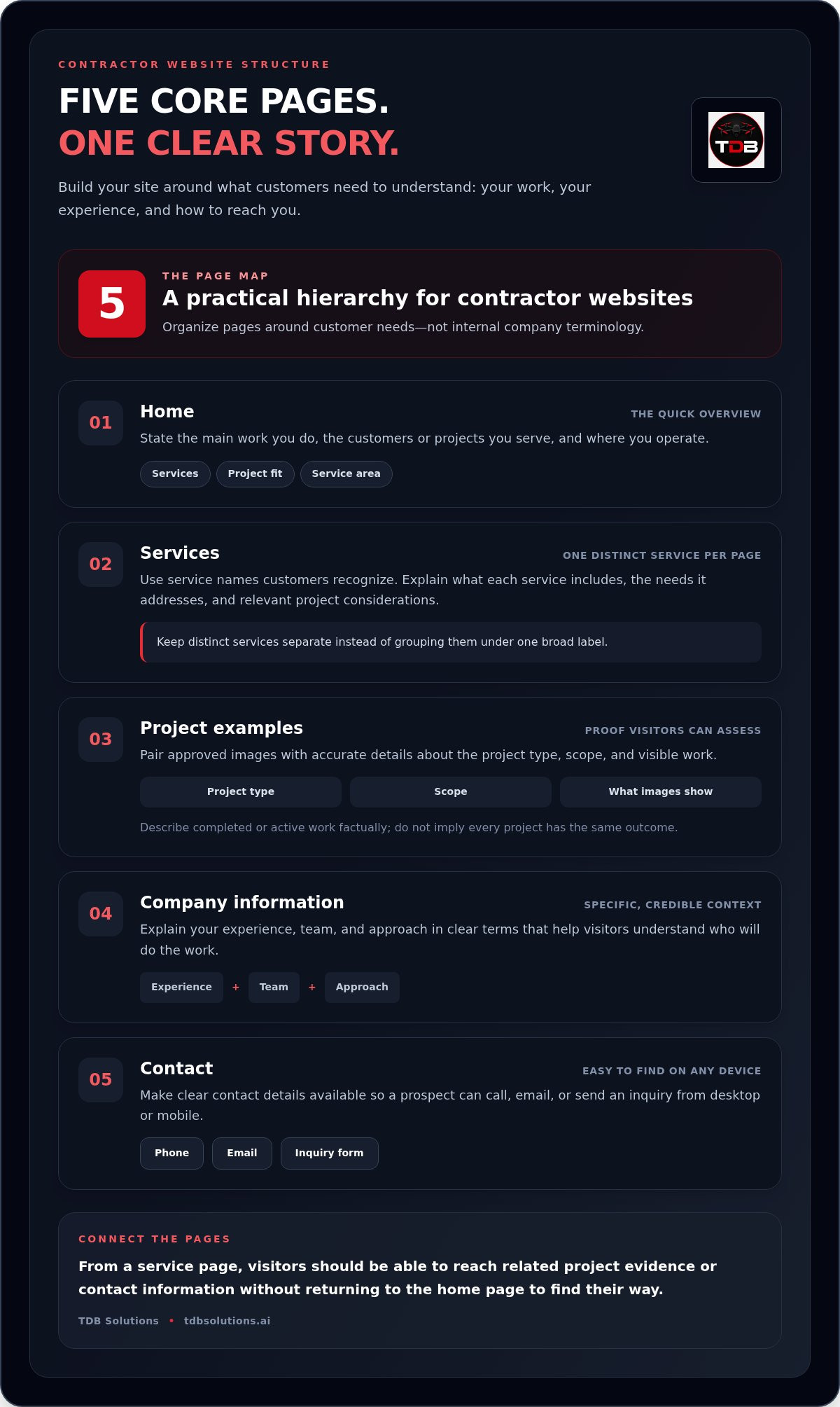
A useful site gives each visitor a clear route from first impression to relevant details. For website design for contractors Houston businesses, organize pages around what customers need to learn, not around internal company terminology. Start with a practical hierarchy:
- Home: State the main work you do, the customers or projects you serve, and where you operate.
- Services: Give each distinct service its own page with a clear description and a next step.
- Project examples: Show relevant completed or active work with accurate descriptions and approved images.
- Company information: Explain your experience, team, and approach in specific, credible terms.
- Contact: Make it easy to call, email, or send an inquiry from any device.
Connect each page to the next. A visitor who lands on a service page should be able to view related project evidence or contact your team without returning to the home page to figure out where to go.
Organize service pages around real contractor work
Use service names customers recognize, then explain what the work includes and what needs it addresses. Keep distinct services separate rather than placing them under one broad label. A service page can outline the typical project scope, relevant considerations, and the information you need from a prospective customer. Add a clear contact path, such as a phone link or inquiry form, so interested visitors can take the next step while the service is fresh in mind.
Use project examples to make experience tangible
Choose examples that match the work you want visitors to understand. Pair high-resolution photos with a short description of the project type, scope, and visible details. Explain the challenge, the work your team performed, and what the images show. Keep statements factual: describe completed work without implying that every project produces the same outcome. Aerial photography can establish site layout and overall context, while a mic'd up business-owner interview can add the contractor’s own perspective when it helps explain the work.
Before publishing, check that every image and project detail is approved for use and accurately represents the job. Make captions specific enough to help a potential customer understand what they’re seeing, but avoid claims the evidence can’t support. For a closer look at mobile usability and clear next steps, connect this page plan with the Houston Web Design: Mobile-First Conversion Guide 2026.
A clear structure turns scattered company information into a practical path through your experience. If you’re ready to shape that path into a custom site, explore custom mobile-first website planning with TDB Solutions.
Compare the Website Elements Houston Contractor Buyers Need
Contractor website elements work best when each one answers a real buyer question. A service description explains fit. Project evidence gives context. Local details clarify coverage. A direct contact path helps a visitor act. Use this comparison to spot gaps and decide what belongs on each page. Strong website design for contractors Houston companies can use connects these pieces without promising a particular ranking, lead total, or conversion rate.
| Buyer question | Useful website content | Where it belongs |
|---|---|---|
| Does this contractor do the work I need? | A plain-language service description, the work included, and the project types it suits. | A dedicated service page, with a short summary on the home page. |
| Has the company handled relevant work? | Accurate project examples with scope, work performed, and details visitors can see. | A project page or portfolio, with related examples linked from service pages. |
| Does the company serve my area? | Specific service locations and clear information about coverage. | A service-area section and relevant service pages. |
| How do I start a conversation? | A clear phone number, email, or focused inquiry form. | The contact page, with a contact path on key service and project pages. |
Match proof to the question a buyer is asking
Use proof that directly supports the claim beside it. If a service page describes a type of renovation, link to a project example that shows similar work. State the project scope and visible details accurately. Company information should explain who does the work and how your team approaches projects. If you include testimonials or client statements, preserve their original meaning and publish them with permission. Credible details matter more than sweeping claims.
Make mobile use and contact paths straightforward
Check the site on a phone, not just a desktop screen. Make sure visitors can read service information, open project examples, and find contact options without excessive scrolling or pinching. Keep forms focused on what you need to begin a conversation, such as the service requested, project location, and a way to reply. Avoid asking for details that aren’t needed at the first step.
Conversion-Focused Features are practical elements that guide a visitor toward a useful action, such as a request-a-bid form or a prominent call button. Their purpose is clarity, not a guaranteed result. Also review core web vitals, the performance measures tied to loading speed, interactivity, and visual stability. Compress oversized media, limit distracting movement, and keep layouts steady to make the site easier to use. Review each page with one question in mind: can a prospective customer quickly find the information and next step they need?
Plan a Houston Contractor Website Without Losing the Customer's Point of View
A strong website plan starts with what a prospective customer needs to know, not with colors or page effects. Gather the facts first, then shape them into clear pages. This sequence keeps website design for contractors Houston-focused and useful to people deciding whether your company fits their project.
- Define your audiences. Identify the customers you want to reach and the kinds of projects they bring. A property manager researching recurring facility work needs different details from a homeowner planning a renovation. Note the questions each audience is likely to ask before contacting you.
- Map your services. Write down each service in familiar customer language. For every one, record the work involved, the project types it suits, and what a prospect should know before starting a conversation. Keep distinct services separate so the site can address each need directly.
- Gather proof. Collect project descriptions, accurate scope details, and photos the business has approval to publish. Record what your team did and what the images show. Avoid unsupported claims about outcomes. Add team and company details, along with the correct phone, email, and inquiry information, in one shared file.
- Plan the pages. Match the content to a simple site structure: home, services, project examples, company information, and contact. Include service-area details where they help customers decide whether you work near them. For a Houston-area contractor, relevant locations might include Houston, Friendswood, Pearland, League City, or Galveston, depending on actual coverage.
- Review on mobile. Open the planned pages on a phone. Check whether service details are easy to scan, project content is readable, and contact options are easy to reach. Test each form and remove questions that don’t help your team begin the conversation.
Gather the material before writing page copy
Start with a practical content file rather than drafting from memory. Include your service list, project types, common customer questions, relevant service locations, approved project images, and concise project notes. Add team biographies and company details only when they’re current and useful to a buyer. This preparation gives whoever writes the pages accurate source material and helps prevent unclear claims or outdated contact details.
Review the website as a prospective customer
Set aside internal company language and approach each page as a first-time visitor. Can you identify the contractor’s main services quickly? Can you find relevant project details and understand the next step? Test navigation, phone links, and forms on a mobile device. Replace vague wording with specific descriptions, remove old project information, and keep inquiry forms focused.
For a closer look at mobile-first planning and clear website paths, explore TDB Solutions' Houston web design guide and use its ideas to shape your project brief.
How TDB Solutions Brings Contractor Web Design and Media Together
Your website can explain the work, while original media helps visitors see and hear the people behind it. TDB Solutions brings custom mobile-first websites together with graphic design, branding, and content creation, giving contractors a consistent way to present their services and project experience online. Coordinating the layout and content keeps each page focused on what prospective customers need to understand.
Connect website design with original contractor content
Project imagery gives visitors a clearer sense of a job’s scale, setting, and visible details. Aerial photography can add an overhead view of a site that ground-level images may not capture. Pair images with captions that accurately describe the project and your team’s role.
A mic'd up business-owner interview adds your voice to the story. Explain the services you provide, how you approach a type of project, or what customers should know before getting in touch. Short interview clips can support a service page or company profile, while written content can carry key information for visitors who prefer to read. Give every photo, caption, and interview a clear purpose on the site.
TDB Solutions brings website design and marketing media production together. In-house graphic design and branding help establish a consistent look, while content creation gives project images and interview material a clear place on the site. Founder Dillon Bates brings over 10 years of survey experience, adding a technical perspective on project details and site context.
Make the next step direct and local
Local relevance comes through in the project material and business information you choose to publish. TDB Solutions serves contractors in Houston, Friendswood, Pearland, Galveston, and League City. Relevant local context can help visitors understand where your business works and whether your services fit their project.
Technical experience and creative production should support one another. A mobile-first layout should present media clearly, keep essential text readable, and make contact options easy to reach. TDB Solutions combines website design with branding, graphic design, and media production to bring these elements together. Your project knowledge and approval help ensure that published details reflect the work accurately.
If you’re a Houston-area contractor ready to connect your website with original project media, call or email TDB Solutions to discuss your website needs.
Make Your Next Website Improvement Count
Choose one page that supports the kind of work you want to take on. Ask someone unfamiliar with your business to review it on a phone. Can they understand the page’s purpose and know what to do next? Their questions can help you spot confusing wording or missing details before you make changes.
Use that feedback to set a focused priority for your next website update. You might clarify a project description, refine a page’s message, or make an important action easier to find. Keep the change tied to a real customer need, then review the result with fresh eyes.
You don’t have to tackle every improvement at once. Start with one clear step. Talk with TDB Solutions about your contractor website and move toward an online presence that helps prospective customers understand your business.
Frequently Asked Questions
What should a contractor website include?
Include clear service descriptions, relevant project examples, company information, service-area details, and an easy way to get in touch. Keep the information current as your business changes. Assign someone to review project details, staff information, and contact methods when updates come up. A shared record of approved wording and images makes future edits easier and helps prevent errors.
How can a contractor website get more local leads in Houston?
Make it easy for Houston-area visitors to find services, project examples, and coverage information relevant to their needs. Include a clear contact path on key pages and keep inquiry forms focused on useful details, such as the service requested and project location. A short optional field such as “How did you hear about us?” can also help you understand whether inquiries come from a referral, a project page, or another source. Review the responses alongside the actual project fit of each inquiry. Website design for contractors Houston businesses can use should help qualified prospects understand what to do next, without implying a guaranteed number of leads.
Should a contractor website have a separate page for each service?
Base the decision on whether a service needs its own explanation. A separate page makes sense when the work has a distinct process, audience, or set of considerations that visitors can’t understand from a shared description. If two offerings differ only slightly, a single page with clear sub-sections may be easier to maintain. Before creating a page, make sure you have enough unique, accurate information to make it useful.
Why does mobile-first web design matter for contractors?
Mobile-first design plans for real phone interactions, not just a smaller desktop layout. Check whether buttons have enough room to tap, text remains readable when visitors enlarge it, and menus don’t cover important information. Try common tasks with one hand, such as opening a service detail or starting a call. These checks can uncover friction that a desktop review may miss.
What photos should a contractor put on a website?
Choose images that help explain a specific point, then add descriptive alternative text for visitors using screen readers. Instead of labeling an image “jobsite photo,” describe its relevant subject, such as a completed roof installation on a commercial building. Keep image files organized by project and date so your team can identify the right asset later. Use only visuals that accurately represent your company’s work.
How long does it take to design a contractor website?
A website timeline depends on the project’s scope and how decisions move through review. To avoid unnecessary back-and-forth, appoint one person to collect feedback from the team and send a consolidated response at each review point. Resolve key decisions about page structure and visual direction early. This approach helps the work progress in an orderly way, though a specific schedule depends on the individual project.
Can aerial photography be used on a contractor website?
Yes. Aerial photography can help illustrate details that are difficult to communicate from ground level, such as a roof’s overall form or the relationship between a building and its surrounding site. Select an image that supports the page’s specific subject, rather than using an overhead view simply for visual effect. Pair the image with accurate project context so visitors understand what it depicts.


